
Most clinics don't have one dramatic efficiency problem. They have fifty small ones that pile up before lunch.
We see the same scene over and over in our work at Simbie AI. The front desk is answering calls while checking in patients. Someone is hunting for an insurance card. A medical assistant is waiting on intake paperwork. The physician is already behind, even though nobody on the team is lazy or careless. The system is what's failing.
That matters because the waste isn't small. In the U.S. health system, administrative burden consumes about 25% to 30% of total healthcare spending, or roughly $1 trillion to $1.2 trillion annually, with much of it tied to billing, scheduling, documentation, and other non-clinical work, according to Zocdoc's review of medical office efficiency. In a clinic, that shows up as rework, interruptions, delays, and people staying late to finish tasks they never had time to do during the day.
We've implemented operational changes across dozens of clinics, and one lesson keeps holding up. Software rarely fixes a bad process. It just makes the bad process happen faster. The clinics that improve medical office efficiency for real start with diagnosis, change the workflow, train people properly, and only then add automation where it fits.
Start with an honest assessment of your current operations
The first mistake most practices make is shopping for tools before they know what's broken.
If your team says, “We're overwhelmed,” that's a symptom, not a diagnosis. You need a before picture that is detailed enough to make the pain visible. That means tracing work from the first patient touchpoint to the final claim, then watching where time gets lost.

Map the patient journey first
Start with one simple exercise. Follow a patient visit from start to finish.
Write down each step:
- First contact: phone call, website request, referral, or portal message
- Scheduling: appointment creation, insurance capture, reminder process
- Pre-visit work: eligibility check, forms, chart prep, referral status
- Arrival and rooming: check-in, consent, copay, vitals, med review
- Checkout and follow-up: follow-up booking, orders, patient instructions
- Back-office closeout: coding, claims, denials, records, refills, prior auths
Don't map the ideal version. Map what really happens on a normal Tuesday.
One of the easiest ways to do this is to shadow a single patient through the whole visit. We do this often, and it changes the conversation fast. Leaders usually think the bottleneck is “the front desk,” but often, the issue is handoff failure. The front desk waits on the MA. The MA waits on intake. Billing waits on documentation. Everyone blames the visible delay, not the earlier missed step.
Practical rule: If the same task gets touched by two or three people “just to be safe,” you probably have a process problem, not a staffing problem.
Watch work, don't just ask about it
Staff interviews matter, but observation matters more. People usually describe the process they think should happen. They don't always describe what happens when the phones light up, a physician runs behind, or one employee calls out.
Use a simple audit method over a few days:
- Stand near high-friction areas. Front desk, MA station, checkout, billing queue.
- Time the task, not the person. How long does intake take when forms are incomplete? How long does a refill request sit before it reaches the right person?
- Mark every interruption. Calls, portal messages, walk-ups, missing signatures, chart questions.
- Ask short follow-up questions. “What slows this down?” gets better answers than “How's workflow?”
- Compare morning flow to afternoon flow. Many clinics have different failure points depending on the time of day.
Keep the tone neutral. If staff think this is a performance review, they'll hide problems instead of showing them.
Don't ignore the room layout
Most practice guides skip physical space, but layout changes how work moves. The AMA's clinic efficiency toolkit notes that placing exam rooms near team work areas, using collaborative team stations, and redesigning room layouts can improve communication, reduce travel between tasks, and may improve patient outcomes and lower costs, as described in the AMA STEPS Forward clinic efficiency toolkit.
We've seen this firsthand. A beautifully designed digital workflow still falls apart if staff have to walk across the office for printing, signatures, or checkout. If the patient checks in at one counter, waits in another area, then walks back to a different desk to pay, you've built delay into the floorplan.
Use a sheet of paper and sketch the movement. Where do patients stop? Where do staff backtrack? Where do small lines form? That simple map often tells you more than a vendor demo ever will.
Establish the baseline metrics you will improve
Once you've seen the mess clearly, you need numbers. “It feels busy” is real, but it won't tell you whether a change worked.
The right baseline is small enough to manage and specific enough to act on. We prefer a short dashboard that covers both patient access and administrative follow-through. If a metric doesn't help you make a decision, leave it off.

Track a short operating dashboard
Use four or five measures first. That's enough to show whether medical office efficiency is getting better or whether work is just moving around.
| Metric | What it tells you | Where to find it |
|---|---|---|
| Average patient wait time | Whether front-office flow and room turnover are holding | EHR timestamps, front-desk logs, rooming timestamps |
| Time to appointment | How long patients wait for the next available visit | Scheduling system or EHR template reports |
| Phone answer and missed-call pattern | Whether access breaks before the visit even gets booked | Phone platform, call logs, call routing reports |
| Time spent per prior authorization or refill workflow | How much hidden admin work one request creates | Manual tracking, task queues, staff logs |
| Claim denial pattern by reason | Whether front-end mistakes are becoming back-end rework | Billing system, clearinghouse, RCM reports |
You don't need a polished analytics platform on day one. In many clinics, the first version of this dashboard is part EHR report, part billing export, part spreadsheet, and part handwritten tally. That's fine if it's accurate enough to compare before and after.
Define each metric so everyone counts it the same way
Many teams slip in this area. They say they're tracking wait time, but one person measures from check-in to rooming while another measures from scheduled appointment time to physician entry. That makes the number useless.
Set the rules in plain language:
- Wait time: pick one start point and one end point
- Missed calls: define whether voicemail counts as “answered”
- Prior auth time: include all touches, not just form completion
- Denials: separate eligibility problems from coding or documentation issues
A clean definition matters more than a fancy dashboard.
If two managers can look at the same workflow and count it two different ways, your baseline isn't ready yet.
Pull data from systems you already have
Most practices already own more information than they use. The issue isn't missing data. It's scattered data.
Pull from what you already have:
- EHR or practice management system for arrival, rooming, checkout, and scheduling patterns
- Phone system for call volume, missed calls, callback queues, and peak times
- Billing and clearinghouse reports for denial reasons and aging patterns
- Manual time studies for work that software doesn't measure well, like prior auth follow-up
If you want a useful reference point for what to monitor, our guide to medical practice metrics is a good starting place.
The goal isn't to measure everything. It's to create a scoreboard you can trust when the redesign starts.
Redesign your core front and back office workflows
This is the part many clinics try to skip. They buy a tool, announce a new policy, and hope the old process somehow improves. It won't.
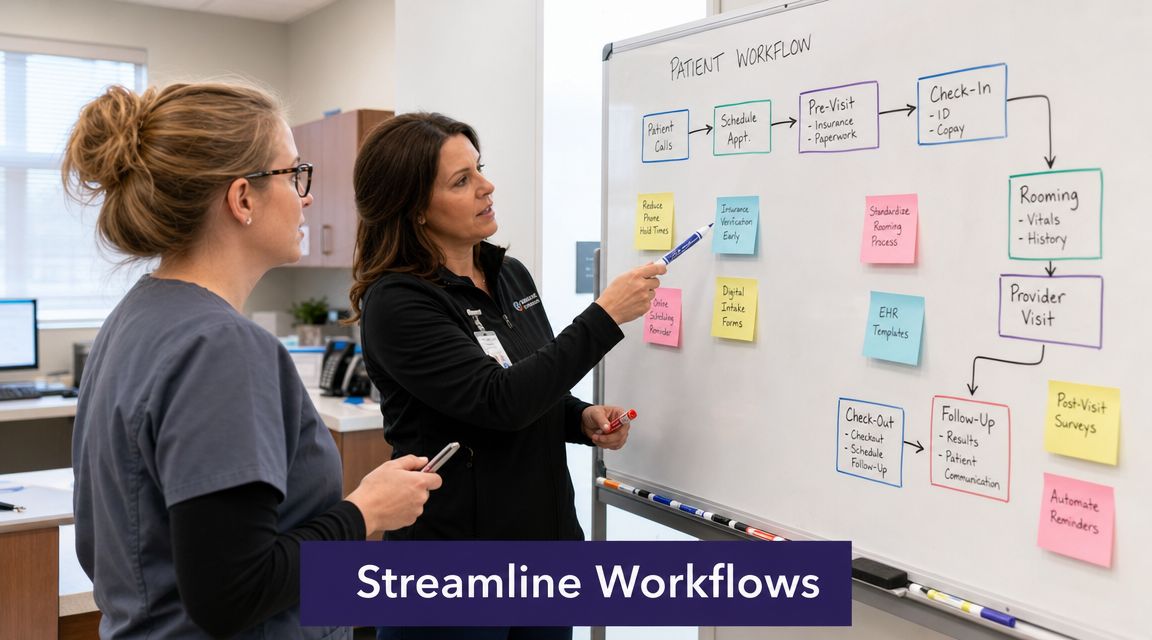
Workflow redesign comes before technology because people need a clean path for work. ASGE's office-efficiency guidance recommends benchmarking staff FTE and costs, then observing task times and redesigning processes such as centralized referral and eligibility checks, digital signature capture, and moving check-in and check-out closer to the exam room to reduce waiting in multiple areas, as noted in ASGE's office-efficiency guidance. That matches what we see in the field. The fix usually starts with task ownership and handoffs, not new software.
Fix the front office by reducing live friction
The front desk often becomes the dumping ground for every unresolved process. Scheduling, insurance questions, walk-ins, copays, forms, and phone calls all collide there.
Here's what usually fails:
- One person does everything. That creates constant context switching.
- Insurance is checked at arrival. That turns coverage issues into lobby issues.
- Paper intake starts at check-in. That delays rooming and creates data re-entry.
- Checkout lives far from the exam area. Patients stop, wait, and ask new questions that restart the process.
What works better is simpler and more boring. Separate call handling from in-person traffic during peak times. Move eligibility checks earlier. Send forms before the visit. Let patients complete signatures digitally. If checkout can happen closer to the exam room, do it.
We've also found that clinics improve faster when they redesign intake as a single flow instead of five disconnected chores. If you're working through that piece, this guide on how to improve patient intake efficiency is a practical place to start.
Clean up the back office by removing rework
Back-office tasks look invisible until they explode. Referrals stall because information is missing. Claims get touched twice. Refill requests bounce between staff because nobody owns the first review. Prior authorizations sit in a queue because the documentation wasn't ready at the start.
A better pattern looks like this:
| Workflow | Before | After |
|---|---|---|
| Referrals | Each team member checks status separately | One owner or centralized queue handles status and exceptions |
| Refills | Messages bounce between clinical and admin staff | Standard refill path with clear criteria for escalation |
| Claims | Errors found after submission | Front-end checks catch missing or mismatched data earlier |
| Prior auths | Staff start work only after denial or request | Required documents gathered as part of pre-visit prep where possible |
The hard truth is that many clinics don't need more effort. They need fewer touches per task.
Match the work to the right role
Older practice benchmarks have shown that productivity rises with the number of FTE staff per FTE physician when roles are assigned correctly. The key phrase is “assigned correctly.” More people without role clarity just means more confusion.
We've seen strong teams get stuck because licensed staff spend time on work that should have been standardized or handled upstream. We've also seen admin staff overloaded with exception handling because nobody built rules for what counts as an exception.
“If every unusual case lands on your most experienced employee, your process isn't helping your team. Your team is rescuing your process.”
Before you add headcount, ask two blunt questions. Who owns this task from start to finish? And how many times does it change hands?
Select and integrate the right automation tools
Automation works best after you've reduced clutter in the workflow. If you automate chaos, you still have chaos. You just have a monthly software bill too.
We've watched clinics buy scheduling tools that don't write back to the EHR, message tools that create duplicate worklists, and AI products that sound impressive in a demo but fail at basic handoff rules. Good selection comes down to fit, not hype.

Buy for the bottleneck you actually have
Group tools by the problem they solve:
- Patient communication tools for incoming calls, reminders, refills, basic intake, and routing
- Scheduling tools for self-booking, waitlists, confirmations, and rescheduling
- Documentation tools for note support, templates, and structured capture
- Revenue cycle tools for eligibility, claim scrubbing, payment collection, and follow-up
- Task management tools for referrals, prior auth queues, and internal routing
If phones are your main failure point, don't start by replacing billing software. If denials are mostly caused by front-end data quality, a prettier call center script won't fix them. Match the investment to the choke point.
One option in the communication category is healthcare automation software from Simbie AI, which handles tasks like call answering, scheduling, intake, and refill workflows with EHR integration. That may fit clinics where phone-heavy administrative work is the main source of interruption. In other clinics, a scheduling or revenue cycle product will be the better first move.
Ask vendors the questions that expose extra work
Most software problems show up after go-live, not during the sales call. Ask direct questions early.
Here's the shortlist we use:
- What data do you read and write? “Integrates with EHR” means very little by itself.
- What happens when the workflow fails? You need to see the handoff path, not just the happy path.
- Who owns implementation tasks? Don't assume your staff can absorb hidden setup work.
- How are exceptions handled? Complex refills, mismatched insurance, duplicate patients, and urgent messages need rules.
- What training is included? If training is generic, adoption usually stalls.
- How do you support HIPAA requirements and auditability? You need a clear answer, not broad reassurance.
A vendor that can't walk through a failed appointment booking or a bad patient record match in concrete terms is telling you something important.
Integration is the real product
The clinics that regret software purchases rarely say, “The feature set was weak.” They say, “It gave us another inbox,” or “Staff had to enter everything twice.”
That's why we treat integration as the true product. A good tool should reduce handoffs, duplicate entry, and queue confusion. A weak one creates shadow work, and shadow work is where teams burn out.
Use a pilot with a narrow scope. One location, one provider group, one call type, or one scheduling lane. Watch real use for a few weeks. Then decide whether the tool belongs in the clinic.
Prepare your team with effective training and change management
Most efficiency projects break not because the workflow was wrong, but because leadership treated adoption like an announcement.
We learned this the hard way years ago. We assumed staff would welcome a better process because the old one was obviously painful. Some did. Others heard “new system” and translated it as “more work, more monitoring, and less control.” That reaction is normal, especially in clinics where teams have survived multiple half-finished change efforts.
Start with the people who influence everyone else
Every clinic has unofficial leaders. They may not have management titles, but everyone watches them. The senior MA who knows every physician preference. The front-desk lead who can calm a full waiting room. The biller who catches issues before anyone else sees them.
Bring those people in early. Not for fake input. For real input.
A rollout usually goes better when you ask them things like:
- What part of this workflow will staff hate first?
- Where will people create workarounds?
- Which patient situations will break this process?
- What would make this feel safer to try?
Their answers are often more useful than the implementation checklist.
The team doesn't need a speech about efficiency. They need proof that leaders understand what the day actually feels like.
Train by role, not by product
One of the most common mistakes we see is one large training session for everybody. Front-desk staff, MAs, billers, and providers all get the same walkthrough. They leave with different questions and the same confusion.
Role-based training works better:
| Role | What training should focus on |
|---|---|
| Front desk | Call flow, scheduling rules, patient scripts, escalation points |
| Clinical staff | Message triage, refill routing, chart impact, exception handling |
| Billing team | Front-end data quality, workflow changes that affect clean claims |
| Providers | What changes in their inbox, what won't reach them, how urgent items are handled |
| Managers | Monitoring, coaching, failure modes, and when to intervene |
Keep the sessions short. Use real scenarios from your clinic, not canned examples. Then run practice reps. The first live day should not be the first time staff touch the new process.
Address fear directly
If you're introducing AI or automation, somebody will worry about job loss. Ignore that fear and it will fester.
We've had better results when leaders say the quiet part out loud: “This change is meant to remove repetitive administrative work, not remove the people who know how to care for patients.” Then back it up with design choices. Reassign staff to higher-value work. Show that exceptions still need human judgment. Make it visible that the team is not being discarded.
Create a small super-user group too. Pick peers who are patient, respected, and willing to help others during the first few weeks. Staff often ask a trusted coworker a question they won't ask in a formal meeting.
And expect a dip. Even good changes feel slower at first. The point is not to avoid that dip. The point is to support people through it without panicking and reverting to the old mess.
Measure your gains and continuously refine your playbook
Once the new workflow is live, go back to the baseline you set earlier. Don't rely on vibes. Compare actual operating data to your original dashboard and look for movement that matters.
Some changes should show up quickly, such as fewer missed calls, cleaner intake, or shorter waits in one part of the day. Others take longer because the downstream effect has to work through claims, documentation, or staffing patterns. That lag is normal. What matters is whether the direction is real and whether the team can sustain it.
Look for balanced improvement
A clinic can improve one metric and still make the day worse.
For example, faster scheduling can flood a physician template that was already tight. Lower phone burden can shift more work into portal queues if routing rules are weak. Better intake can expose a rooming bottleneck that was always there but hidden by front-desk delays.
That's why we review changes in pairs or groups:
- Access plus capacity
- Speed plus accuracy
- Staff time plus patient experience
- Front-end gains plus back-end rework
If one area improves by dumping pressure into another, you haven't fixed the system yet.
Use monthly review, not constant tinkering
Too many clinics overreact to single bad days. A physician ran behind. Two employees were out. The phones were packed. That doesn't mean the redesign failed.
Use a regular review rhythm instead. Monthly is usually enough to see patterns without turning management into panic. Ask:
- Which metric improved?
- Where did work shift?
- What complaint do we hear more often now?
- Which exception still has no owner?
- What does the team keep working around?
Write down the answers. The best operations teams build a playbook one solved bottleneck at a time.
Plan for the next constraint
There's a more advanced problem that shows up after a clinic gets faster. Demand rises. Access improves, then fills. Staff can feel that pressure before leaders do.
That's why the next stage of medical office efficiency isn't just moving faster inside one building. It's deciding where care should happen. Vizient notes that health systems need a multipronged approach that includes assessing service-line breadth, patient acuity, and shifting some care to ambulatory, virtual, or home models. That reflects a broader move toward managing throughput by redistributing work across sites, not just speeding up one clinic, as discussed in Vizient's analysis of capacity strategy.
That same logic applies in smaller practices. Not every task needs the same channel, the same person, or the same location. The more honest you are about that, the easier it is to grow without rebuilding the same bottlenecks.
The next step is simple. Pick one broken workflow this week, measure how it behaves now, and make one change your team can absorb.
If your clinic is drowning in calls, scheduling friction, refill requests, or intake work, Simbie AI can help you reduce repetitive administrative load without forcing staff into yet another disconnected system. Start with one workflow, test it in a live environment, and build from there.