

Most practices don't have a data problem. They have a reporting problem.
I've sat with front-desk logs, EMR exports, billing reports, and call notes spread across too many tabs, trying to explain a simple question: if the schedule looks full, why does cash still feel tight and staff still feel buried? That's the daily reality in a lot of clinics. You can pull reports all day and still miss what is breaking.
The old method is familiar. Run last month's numbers, paste them into a spreadsheet, spot a few ugly trends, and promise to “watch it more closely.” That approach is too slow now. By the time a manual dashboard tells you no-shows are climbing or denials are piling up, the damage is already in the books and the team already feels it.
What changed is not just software. It's the expectation that the digital backbone of modern patient care should connect scheduling, billing, intake, and communication well enough to show problems while they're still fixable. Yet many small practices still aren't there. A 2025 HIMSS report cited by Docpace says only 28% of small practices use AI for revenue cycle monitoring, and practices that don't use it see 15% to 20% higher no-show rates than AI adopters. The same write-up points to an emerging target of more than 85% AI-handled interaction resolution rate for workflow improvement, which tells you where operations are heading, not just where they've been (Docpace).
That gap matters because most guidance on medical practice metrics still treats reporting as a monthly accounting exercise. It isn't. Good metrics should help you act today, not explain last quarter.
Stop guessing and start measuring your practice's health
The most expensive sentence in practice management is, “I think we're doing fine.”
You hear it when visits are up but collections lag. You hear it when the front desk says phones were “crazy all week,” but nobody can show how many calls turned into booked appointments. You hear it when providers feel overbooked, even though the template still has empty slots hiding in odd corners of the day. Guessing feels harmless because it sounds practical. It isn't.
Why manual tracking breaks down
Manual reporting fails in predictable ways:
- It arrives late: By the time someone updates the sheet, the scheduling problem or billing issue is already old.
- It depends on one person: If your office manager is out, the reporting cadence often disappears with them.
- It hides causes: A single bad number rarely tells you what caused it. You need connected data, not isolated totals.
- It creates false confidence: Teams start trusting neat spreadsheets more than messy reality.
I learned this the hard way years ago when we were looking at rising visit volume and assuming that should cure a revenue slump. It didn't. The missing piece was that volume alone wasn't the story. Some visits weren't collected cleanly, some claims stalled, and some appointment demand died on the phone before it ever hit the schedule.
Practical rule: If a metric needs manual cleanup before you can trust it, it's a weak management tool.
What better tracking looks like
A useful metric has three traits. It's easy to define, easy to pull, and tied to a decision someone can make this week.
That's why I care less about how many reports a system can produce and more about whether the clinic can see what changed yesterday. Real tracking means knowing if call handling slipped, if intake slowed rooming, if denials rose for one payer, or if schedule utilization looks healthy on paper but is weak in the hours you need filled.
Medical practice metrics stop being abstract once they're tied to action. If the number can't change staffing, scheduling rules, patient reminders, or billing follow-up, it's just trivia.
The four categories of medical practice metrics
A decent dashboard gets easier once you stop treating every number as equally important.
I group medical practice metrics into four buckets. That keeps the team from chasing one shiny number while ignoring the rest of the operation. A practice can collect money and still frustrate patients. It can move patients quickly and still have weak billing discipline. The point is balance.

Financial metrics
These tell you whether the practice turns work into cash in a clean, timely way. Revenue can look fine at a glance while cash flow is still under pressure. That usually means collections, denial management, or A/R follow-up need attention.
This category is where most owners look first, and for good reason. If financial metrics are weak, every staffing and growth decision gets harder.
Operational metrics
This is the day-to-day engine room. Scheduling efficiency, call handling, intake flow, wait times, and no-shows sit here.
I pay close attention to operational metrics because they show stress before the financial reports do. Staff usually feel an operational problem first. Patients do too.
Good operations data should tell you where time is getting lost, not just where money is getting lost.
Clinical quality metrics
This bucket matters because speed alone is not a win in healthcare. A practice still has to track whether care processes are consistent and whether documentation supports what happened in the room.
I'm not putting hard benchmarks here because they vary a lot by specialty, contract structure, and care model. But every clinic should define a short list that reflects its actual care priorities, not just what's easiest to export.
Patient experience metrics
This category is often treated like fluff until patient leakage becomes obvious. It's not fluff. Access problems, billing confusion, long waits, and dropped calls show up here before they show up in retention.
If you've ever looked at broad metrics for performance reviews outside healthcare, the same basic lesson applies. People improve what gets measured clearly and discussed regularly. Practices are no different, but their importance is amplified because patient trust is tied to the numbers.
Here's the simple test. If your dashboard only shows finance, it's incomplete. If it only shows operations, it's noisy. If it includes all four categories, you can usually spot cause and effect faster.
Tracking your financial health and revenue cycle
Many practices often fall prey to this.
You can have busy providers, full parking lots, and still feel cash pressure every payroll cycle. Financial medical practice metrics tell you whether the work being done is becoming collectible revenue, and whether it's getting into the bank fast enough to matter.
The big three I watch first
These are the first numbers I'd pull in almost any practice:
| Metric | Formula | Industry Benchmark |
|---|---|---|
| Net Collection Rate | Payments Collected / (Total Charges – Contractual Adjustments) × 100 | 95% to 98% |
| Days in Accounts Receivable | Total A/R / Average Daily Charges | Under 40 days |
| Claim Denial Rate | Denied Claims / Total Claims Submitted × 100 | Below 5% |
Top-performing practices keep Net Collection Rate at 95% to 98%, keep Days in A/R under 40 days, and hold Claim Denial Rate below 5%, versus an industry average of 10% to 15%. MGMA also notes that practices above 50 days in A/R face 15% to 20% higher bad debt risks (MGMA).
Those numbers matter because each one tells a different story.
- Net Collection Rate: This shows how much of the money you were allowed to collect made it through. If it's weak, I don't assume “collections staff need to work harder.” I look at charge capture, coding, payer rules, and patient balance workflow.
- Days in A/R: This is lag. The longer cash sits out there, the less useful it is to the practice.
- Claim Denial Rate: This is usually where hidden process failures show up. Bad eligibility checks, rushed documentation, missing auths, wrong coding, or weak follow-up can all land here.
Point-of-service collections are not optional
A lot of small practices still treat patient responsibility as something to deal with later. That habit gets expensive.
The benchmark for point-of-service collections is 70% to 80% of patient responsibility at visit time, and collecting then can reduce downstream collection costs by 50% according to the verified benchmark set in the MGMA-based data above. If your team avoids the conversation at check-in or check-out, you're not being patient-friendly. You're just choosing harder work later.
One resource I often point people to if they're trying to boost practice cash flow is a plain-language breakdown of revenue cycle weak points. It helps non-billing managers understand where the money stalls.
“Cash flow problems in clinics usually start as workflow problems.”
What the numbers mean in real life
A bad A/R number means earned money is unavailable. A bad denial rate means your staff is reworking claims instead of preventing errors. A weak collection rate means the practice is doing work that doesn't fully turn into revenue.
That's why I prefer financial dashboards that are small and strict. Too many practices bury these core figures inside giant billing packets nobody reads.
I also want the dashboard tied to the process that moves the number. If prior authorization issues are causing denials, track auth completion before the visit. If patient balances pile up, fix eligibility and upfront estimate conversations. If reporting is fragmented, tools that connect scheduling, intake, and billing can help. For example, some teams use revenue cycle optimization workflows to reduce the gap between front-desk activity and financial reporting.
What doesn't work
A few habits almost always fail:
- Watching charges instead of collections: Charges can look healthy while payment performance slips.
- Reviewing A/R by total only: Aging buckets matter. Old A/R and fresh A/R are not the same problem.
- Treating denials as normal: They may be common, but that doesn't mean they're acceptable.
- Waiting for month-end: If a payer issue starts on the second day of the month, you need to know before the close.
Financial data should make someone act. If it doesn't, the report is too late, too broad, or too messy.
Gauging your operational and clinical efficiency
By 10:15 a.m., the warning signs are usually already there. The first physician is running behind, the front desk is still clearing insurance questions from the 8:30 block, two patients have not shown up, and the phones are stacking up while rooming falls a few minutes behind. By lunch, the staff feels the strain even if the schedule still looks full on paper.

The operational numbers that change daily decisions
For day-to-day management, I keep coming back to three metrics:
- Appointment utilization rate
- No-show and cancellation rate
- Average wait time
MGMA notes that scheduling efficiency, no-shows, and patient flow are core medical practice performance measures because they affect both capacity and patient experience (MGMA medical practice KPI guidance). Those measures matter because they show whether the clinic is using provider time well or spending the day reacting to preventable disruptions.
The old way to track them is painfully familiar. Someone exports a scheduling report, another person checks timestamps in the EMR, and nobody fully trusts the numbers because each system defines the visit differently. That is why more practices are shifting from manual spreadsheet reviews to healthcare operational efficiency tools that pull scheduling, intake, and workflow data into one view. AI helps most when it handles the tedious part first: collecting timestamps, flagging bottlenecks, and spotting patterns staff would miss in a weekly report.
A full schedule can hide weak operations
A packed template does not prove the clinic is efficient. I have seen fully booked days produce poor access, long waits, and exhausted staff because the visit mix was off and the handoffs were sloppy.
Utilization works best when you break it down by provider, location, visit type, and time of day. Otherwise, one busy physician can hide open capacity elsewhere. No-show rate also needs context. New patient visits, behavioral health follow-ups, and Monday morning slots often behave differently, so the fix should match the pattern instead of treating the entire schedule as one problem.
Wait time deserves the same discipline.
Measure it from check-in to provider encounter, not just time in the lobby. If rooming starts on time but the provider is delayed by incomplete charts, missing pre-visit work, or unsorted refill questions, the schedule problem started long before the patient sat down.
Where manual tracking breaks down
Operational reporting tends to fail in two places. The first problem is lag. By the time a manager reviews last month's average wait time, the staffing issue or template problem that caused it may already be different. The second problem is labor. Front-office leads and office managers should not spend hours stitching together PMS exports, EMR timestamps, and call logs just to confirm what the team already suspects.
Real-time collection changes the quality of the decision. If AI sees that one provider's afternoon sessions are consistently delayed after double-booked procedure slots, that is actionable. If it notices no-shows rising after reminder texts fail to send, that is actionable too. Static reports describe what happened. Automated monitoring helps the practice intervene while the pattern is still small.
The hidden cost of no-shows and delays
No-shows create an empty slot. Delays create a chain reaction.
Staff reshuffle the day, physicians get uneven blocks of work, and patients who arrived on time absorb the consequences. Delayed starts also tend to spill into chart completion, inbox work, and referral processing later in the day. A clinic can look productive at 4 p.m. and still be creating tomorrow's backlog.
That is why I do not look at no-shows as a scheduling issue alone. I want to know which reminder sequence was used, whether eligibility was confirmed, whether transportation or language support was addressed, and whether specific visit types are more likely to fall out. AI is useful here because it can sort those variables faster than a manager scanning appointment notes line by line.
Clinical efficiency is about prep, flow, and follow-through
Clinical efficiency gets misread as speed. In practice, it is closer to readiness.
The right chart is complete before the visit. The patient is scheduled into the right slot length. Orders, authorizations, and intake forms are handled before they slow down rooming. The provider can focus on care instead of fixing avoidable administrative misses in real time.
A fast visit that creates coding errors, incomplete documentation, or follow-up confusion is not efficient. It just moves the mess downstream. The better standard is clean flow with fewer rework points, and that only becomes visible when the practice stops relying on monthly manual summaries and starts using live operational data to catch friction as it develops.
How to collect data and build your dashboard
Most dashboards fail before the first chart ever loads.
The failure starts with data collection. Someone has to pull appointment data from one place, billing data from another, call data from somewhere else, and patient feedback from a tool nobody logs into consistently. Then the office manager becomes the human interface between five systems that don't talk to each other.
Where the raw data usually lives
In most practices, the core data is already there. It's just scattered.
- EMR: Provider encounters, documentation timing, chart completion, visit status
- Practice management system: Scheduling, cancellations, no-shows, insurance details, collections
- Billing platform or clearinghouse: Claim submission status, denials, A/R, payment lag
- Phone and messaging tools: Call volume, abandoned calls, response delays, refill and scheduling requests
I don't recommend building a huge reporting project at the start. Build a one-page dashboard first. If the team can't use a simple version every week, they won't use a fancy version every day.
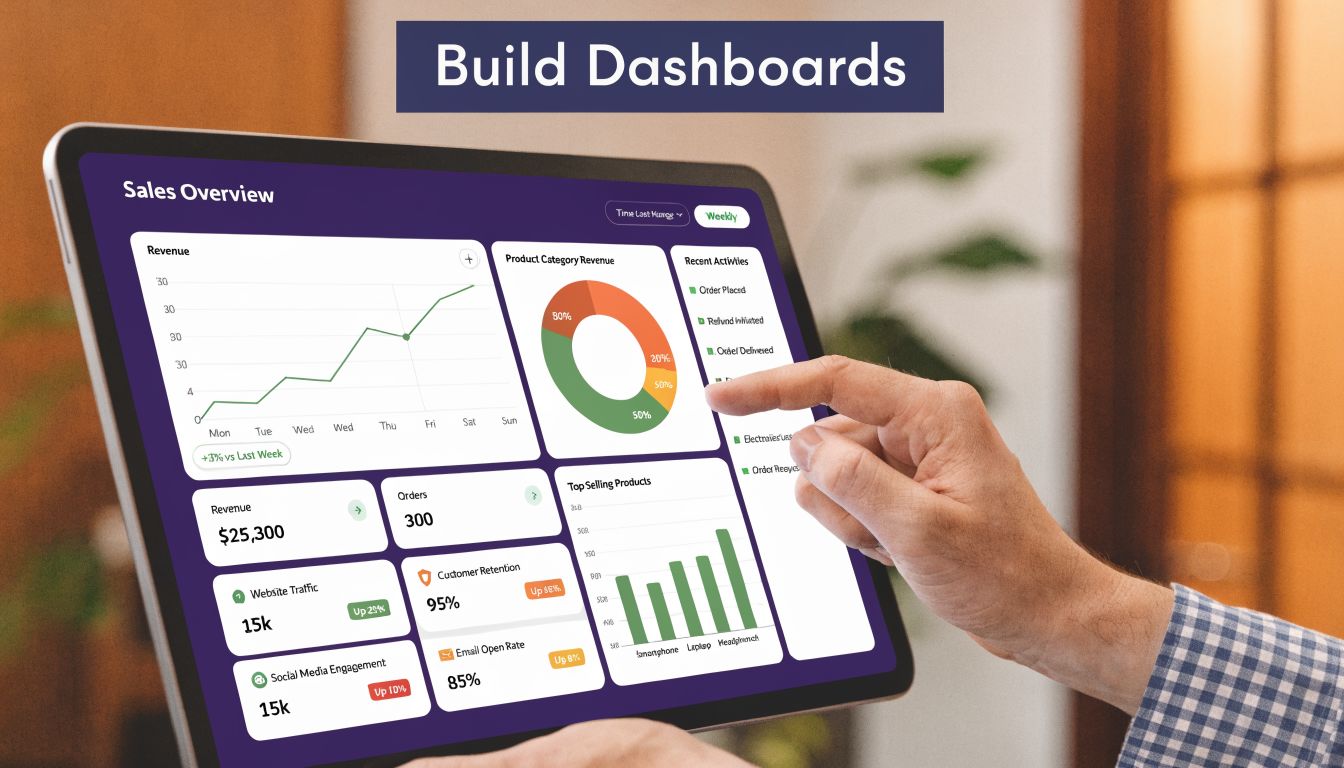
A dashboard that people will actually use
A workable dashboard needs a few things:
- A short metric list: Keep it to the numbers someone can act on now.
- A clear owner: Every metric needs a person, not a department.
- A review rhythm: Weekly for operations, monthly for finance is a practical starting point.
- A simple status view: Green, yellow, red is often enough if definitions are clear.
I also like one line under each metric that answers, “What changed?” A dashboard without context invites pointless debate.
The best dashboard I ever used was not the prettiest one. It was the one the supervisors actually opened before huddle.
Correlate, don't just collect
One of the biggest mistakes I see is tracking productivity in isolation. High visit volume looks good until the back office can't support it.
Aspect Billing Solutions makes this point directly: productivity metrics like patients seen per day only matter when you compare them with financial measures such as denial rates. Their example is straightforward. A practice seeing 25 patients per day per provider but carrying a 15% denial rate and 60+ Days in AR has an admin and documentation bottleneck, not a productivity success (Aspect Billing Solutions).
That's where automation starts to earn its keep. If call outcomes, intake details, scheduling requests, and documentation triggers can feed the dashboard automatically, the team stops wasting hours assembling stale data. Clinics that want these systems talking to each other usually start with EMR system integration, because manual copy-paste between tools is where reporting quality starts to fall apart.
Where AI fits without making a mess
AI is useful when it reduces manual logging and closes delays between what happened and what got recorded. It's not useful when it adds another dashboard no one checks.
Used well, AI can log call outcomes, capture appointment requests, note refill patterns, and surface missed follow-up tasks. Simbie AI is one example in this category. It uses voice agents for healthcare admin work and writes interaction data back into existing systems, which is more useful than producing a separate pile of analytics.
What works is narrow deployment first. Start with reminders, call handling, intake, or authorization support. Tie that data to one dashboard. Then decide what else deserves automation.
Your next steps to improve key practice metrics
A dashboard only matters if it changes behavior next week.
I wouldn't start with ten projects. I'd start with one bad metric in each of two areas: one financial, one operational. That gives you a manageable test and makes it easier to see whether the fix worked.
Start with the metric that hurts twice
Pick a number that damages both revenue and workload. No-shows are a good example. Denials are another.
Then match the fix to the failure:
- If no-shows are high: Use automated text and voice reminders, confirm appointments earlier, and keep a waitlist process that someone owns.
- If wait times are slipping: Look at intake friction, room turnover, and provider template design before blaming staff speed.
- If denials are rising: Check eligibility, authorization workflow, and documentation handoffs before adding more claim follow-up labor.
- If point-of-service collections are weak: Train staff on scripts, verify benefits earlier, and make patient responsibility visible before the visit.
Fix process before adding headcount
I've seen practices respond to bad metrics by hiring around the problem. Sometimes that's necessary. Often it isn't.
If your front desk is buried because calls, reminders, scheduling changes, refill requests, and insurance questions all hit the same people at once, more bodies might help for a while. But process redesign and automation usually create more lasting relief than asking a bigger team to survive the same broken workflow.
Review weekly, not emotionally
This matters more than people think. Practices often react to one bad day. That leads to noisy decisions.
Review the operational dashboard weekly. Use the same definitions every time. Ask four questions:
- What moved?
- Why did it move?
- Who owns the fix?
- When do we review it again?
That rhythm keeps the team from turning every metric meeting into a complaint session.
If you can't name the owner and the next action, you don't have a management system. You have a scoreboard.
Make automation earn its place
Don't buy software because it sounds modern. Buy it if it removes a repeated manual step, improves data quality, or lets staff spend more time on patients than on phones and portals.
If I were setting priorities for next week, I'd do this in order: clean up reminders, tighten upfront eligibility and collections, map denial causes, and automate the parts of intake and call handling that are repetitive and easy to standardize. That sequence tends to improve medical practice metrics without causing chaos.
Simbie AI fits this conversation if your team is stuck doing the same scheduling, intake, refill, and phone tasks by hand. Its voice-based system is built for healthcare workflows, integrates with EMR environments, and can feed cleaner operational data back into the practice so your dashboard reflects what's happening now, not what someone had time to enter later. Explore Simbie AI if you want to reduce manual admin work while getting more usable practice metrics from the systems you already have.