
Your front desk already knows the pattern. Two lines are ringing, a pharmacy is calling back about a refill, a new patient wants the next available consult, and someone at checkout needs help in person. Inbound call automation healthcare matters most in that exact moment, when access breaks down because your staff is doing five things at once.
For independent dermatology, gastroenterology, and internal medicine practices, the goal isn't to bolt on another phone tree. It's to put a clinically aware layer in front of routine work so calls get handled, documentation gets captured, and your physicians aren't dragged into tasks that should have been resolved before the chart ever reaches them.
Defining Inbound Call Automation for Your Practice
The simplest way to define inbound call automation healthcare is this: a system that answers, resolves, and documents routine patient phone requests without waiting for a human to pick up.
That sounds similar to an answering service until you look at what happens on a busy clinic day. A traditional service takes a message. A useful automation system completes the task. It can schedule, gather intake details, capture refill requests, and move the information into the workflow your staff already uses.
For a smaller practice, that's the difference that matters. If staff still has to listen to messages, call the patient back, re-enter details, and sort out what the caller really needed, you haven't removed work. You've delayed it.
What it should handle on day one
A practical system usually starts with high-frequency call types:
- Scheduling requests: New patient, follow-up, procedure visit, reschedule, cancellation.
- Routine intake: Demographics, insurance details, reason for visit, medication list prompts.
- Medication questions: Refill requests, pharmacy coordination, renewal routing.
- Basic access tasks: Directions, office hours, prep instructions, appointment confirmation.
The wider lesson is familiar outside medicine too. Teams looking at automating processes across HR and sales often learn the same thing first, routine work only creates value when the automation can complete the workflow, not just collect a message for someone else.
Practical rule: If the tool creates another inbox for your staff to manage, it isn't real automation.
A lot of administrators start by looking for an AI receptionist. That's reasonable, but it can be too narrow. The front desk problem begins with phones, yet it usually spills into intake, scheduling logic, refill handling, and chart prep. That's why a broader model such as an AI medical receptionist is often a better fit than a basic call-answering layer.
Beyond Answering Phones Clinical-Grade Workflows
A phone bot that says hello isn't hard to find. A clinical-grade workflow is harder, because it has to understand how a medical office runs.

The dividing line is whether the system can operate as part of your staff. In a dermatology office, that means knowing a suspicious lesion visit is not booked the same way as a cosmetic follow-up. In gastroenterology, a procedure-related call has different rules than a routine consult. In internal medicine, refill requests and chronic disease follow-up can't be treated like generic customer service tickets.
Front-office automation that actually reduces work
The first layer is administrative, but it needs to be specialty aware.
A useful system doesn't just ask for a preferred date. It identifies whether the patient is new or established, captures the reason for visit, applies your scheduling rules, and places the patient into the correct slot. If your practice uses eClinicalWorks, gGastro, EMA ModMed, Athenahealth, Epic, or DrChrono, that information should move into the record and schedule where staff can act on it.
That same standard applies to common inbound calls:
| Call type | Basic phone automation | Clinical-grade automation |
|---|---|---|
| New patient scheduling | Takes a callback request | Captures visit reason, registration details, and books appropriately |
| Refill request | Records voicemail | Collects medication details and routes for proper review |
| Prep or office questions | Plays canned menu options | Gives guided answers based on approved practice information |
| Cancellation | Notes that patient wants to cancel | Opens the slot and can support recall or rescheduling workflow |
Many teams realize they don't need another vendor that lives only at the switchboard. They need workflow execution.
Clinical support starts before the visit
The second layer is where the value gets more interesting. Good inbound call automation in healthcare doesn't stop at the front desk. It can support pre-visit HPI collection, medication reconciliation prompts, refill intake, and post-visit follow-up steps that usually land on nurses, MAs, or physicians after hours.
A patient calls to confirm an appointment and mentions worsening symptoms. A shallow system treats that as a confirmation call. A better system captures the update, routes it correctly, and documents it where the clinician can review it before the visit.
A patient calls after a procedure with a routine question. Another patient calls with a refill request tied to an upcoming visit. A front-desk-only tool hears two phone calls. Clinical-grade automation hears two different workflows.
The most useful healthcare AI doesn't try to sound impressive. It quietly removes predictable work from the day.
That broader model is why we talk about AI Medical Staff, not just reception coverage. The administrative layer matters, but so does support for test result follow-up, patient education, adherence outreach, pre-op and post-op calls, and chronic disease management campaigns. A voice AI agent should be able to work across both layers, with escalation when a human needs to step in.
Protecting Doctors' Time for Doctoring only happens when the system handles the work around care, not just the first ring of the phone.
The Impact on Practice Health and Patient Access
When practices adopt inbound call automation healthcare the right way, the first impact is operational. The second is cultural.
Operationally, the case is straightforward. If your system captures 100% of inbound calls, stays available 24/7, and gives patients zero hold times, access no longer depends on whether two front-desk staff members are both free at 10:15 on a Monday. That changes how new patients reach you and how existing patients stay connected to care.
For the team, the effect is less dramatic on paper and more obvious in the office. Staff stop spending most of the day triaging routine requests. They can handle the work that really needs a person, in-person patient issues, prior auth follow-up, complex scheduling exceptions, and billing questions that don't fit a script.
Burnout and support capacity are linked
There's one data point worth paying attention to here. According to the MGMA analysis of better-performing practices, the most successful medical practices have a physician burnout rate that is 33% lower than their peers, often attributed to better support staff and reduced administrative tasks.
That doesn't mean software fixes burnout by itself. It doesn't. But it does support a point administrators already know from experience: when doctors and staff spend less time on repetitive administrative work, the practice runs better.
Where practices usually feel the difference first
The changes usually show up in a few places before anyone talks about strategy.
- Access after hours: Patients can request appointments, ask routine questions, or start a refill workflow when the office is closed.
- Front-desk stability: Teams are less likely to spend the whole day in reactive call mode.
- Visit readiness: More information gets gathered before the patient arrives.
- Patient retention: Fewer callers disappear into voicemail or long callback queues.
We've also seen practices reduce front-office staff costs by up to 60% when automation covers a large share of repetitive call and intake work. That shouldn't be read as a reason to strip your team down to the bone. In most independent practices, the better use is to stop hiring reactively for phone coverage and let your existing staff work at the top of their role.
Better patient access is not just a service issue. It's an operations issue that shows up in retention, scheduling stability, and staff fatigue.
For community practices, that matters because your patient experience isn't built by marketing alone. It's built by whether a patient can reach your office, complete a task, and move forward without friction.
A Practical Roadmap for Implementation
Most failed deployments start with the wrong question. Teams ask, "Can this AI answer our phones?" They should ask, "Which work should leave our staff first, and what has to happen in the chart when it does?"
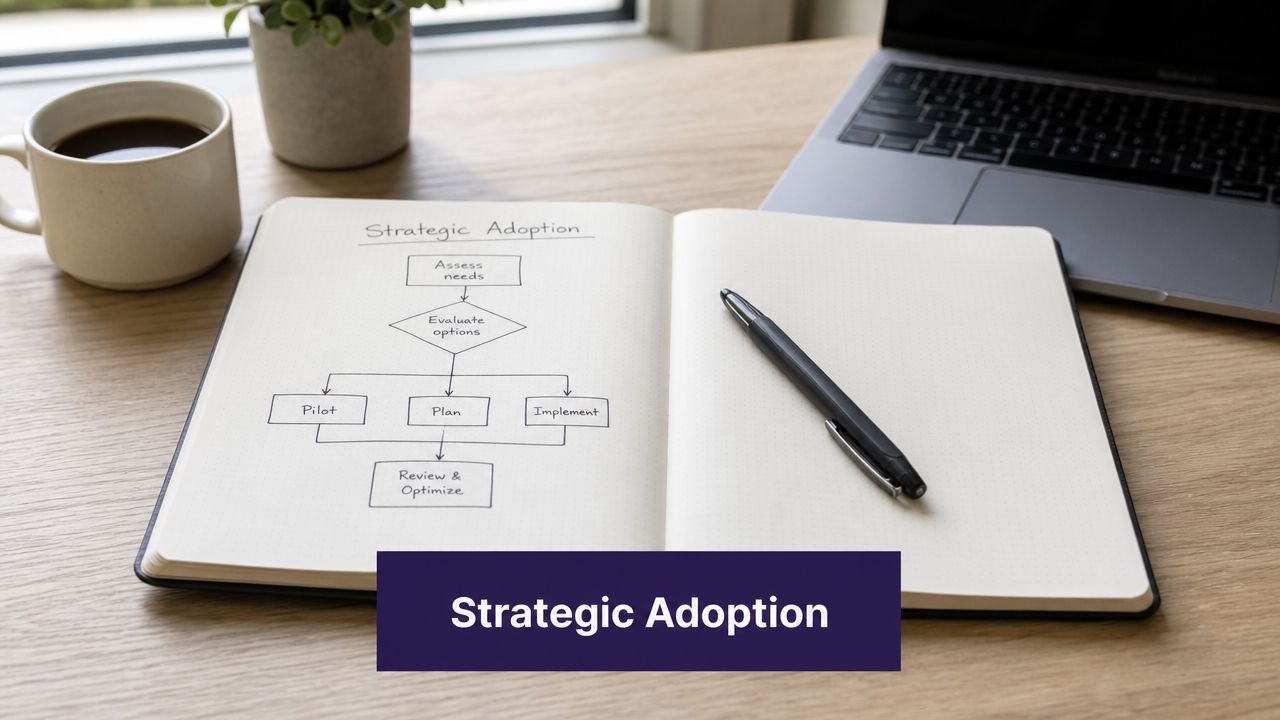
Start with your call map
Before evaluating any vendor, map your top call reasons. Not in theory. Pull real call categories from the front desk.
In a dermatology office, you may see new patient access, pathology follow-up questions, medication refill requests, and cosmetic scheduling. In GI, it may be consult scheduling, prep questions, pharmacy coordination, and procedure reschedules. In internal medicine, refill volume and chronic care questions often dominate.
A short working list helps:
- List the repeatable calls first. These are the easiest to automate safely.
- Separate simple from nuanced. Address changes and standard scheduling are not the same as symptom escalation.
- Note where staff re-enters data. Those are the workflows most likely to waste time after the call ends.
If you skip this step, demos will look better than reality.
Test for clinical understanding, not just conversation
A lot of systems can sound polished on a scripted call. That isn't the same as understanding clinical operations.
Ask practical questions. How does the system handle a refill request for a routine medication versus a controlled substance? What happens when a patient mixes two topics in one call, such as rescheduling and asking about prep instructions? Can it collect pre-visit history in a way that helps the visit, not just generates another note to clean up?
Clinician-built design is particularly important. Simbie AI, for example, is positioned as AI Medical Staff rather than a simple answering layer, covering front-office work and clinical support tasks such as refills, intake, test result review support, patient education, and follow-up workflows. It was built by physicians from Stanford, Yale, Columbia, and Princeton, which matters less as a credential line and more as an explanation for why scheduling rules, intake structure, and escalation paths feel grounded in actual practice operations.
Require direct workflow integration
If the system doesn't write back into your day-to-day tools, staff will hate it.
For most independent practices, that means proven connectivity with eClinicalWorks, gGastro, EMA ModMed, Athenahealth, Epic, or DrChrono. It should move captured data into scheduling and chart workflows rather than forcing someone to copy from transcripts or dashboards later. A vendor should be able to show what its EMR integration with AI receptionist workflows looks like in practice, not just promise that an API exists.
A simple evaluation table helps keep the discussion honest:
| Evaluation area | What to ask | Bad sign |
|---|---|---|
| Scheduling logic | Can it follow specialty-specific visit rules? | It books everything into a generic slot |
| Refill workflow | How are requests captured and routed? | It only records a message |
| EMR write-back | What gets documented automatically? | Staff must manually re-enter details |
| Escalation | When does a human take over? | The answer is vague or overly broad |
Security needs to be boring and clear
Healthcare teams don't need flashy security language. They need specificity.
Look for HIPAA-compliant controls, a willingness to sign the appropriate agreements, clear access controls, and strong handling of call recordings and transcripts. If a vendor is serious about security, they should also be clear about certifications such as SOC 2 Type 2 and how data moves through their system.
Operational advice: The more complicated a vendor makes the security explanation, the more work your compliance review is going to be.
Implementation should also be staged. Start with a narrow lane such as appointment scheduling, intake, or refill capture. Then add pre-visit HPI collection, patient education calls, and chronic disease outreach once the first workflows are stable. That gives staff a chance to trust the system before it expands into more clinical touchpoints.
Avoiding Common Pitfalls with Healthcare AI
The skepticism around healthcare AI is justified. Most administrators have seen tools that looked fine in a demo and created cleanup work the minute real patients started using them.
The first mistake is choosing a generic chatbot with a voice layer. It may handle office hours well enough, but clinical language, specialty scheduling rules, and pharmacy-related requests expose the gaps quickly. Patients get frustrated, and staff ends up fixing the call after the fact.
Bad automation shifts work instead of removing it
This is the trap. A system can appear efficient because it answers quickly, yet still increase workload if the output is messy, incomplete, or detached from the chart.
Common warning signs include:
- Weak intake capture: The system gathers fragments, not actionable information.
- No chart connection: Staff must copy and paste details into the record.
- Blunt escalation rules: Too many calls go to people because the AI can't separate routine from complex.
- Generic language handling: Medical terms, drug names, and specialty workflows get mangled.
If you want a reminder of what poor data handling can trigger in healthcare operations, this review of poor data quality incidents in healthcare is worth reading. The point isn't that phone automation causes those exact failures. It's that low-quality data moving through a clinical environment creates downstream risk very quickly.
Compliance claims can be thinner than they sound
Another common problem is treating compliance as a marketing phrase. "HIPAA-ready" language means very little on its own. You need to know how patient conversations are stored, who can access them, what the audit trail looks like, and how exceptions are handled.
A serious practice should ask for a real walkthrough of the vendor's HIPAA BAA compliant AI phone system controls, including how transcripts, recordings, and role-based permissions are managed. If the explanation gets slippery, move on.
Good healthcare AI supports clinical judgment. It doesn't pretend to replace it.
That last point matters. The goal is not to replace physicians or remove human staff from every patient interaction. The goal is to automate the predictable work, then hand off edge cases, judgment calls, and sensitive conversations to the right person without friction.
Measuring Success with the Right KPIs and ROI
If you don't define success before go-live, every review meeting turns into opinion.

The right KPI set is usually smaller than people think. You don't need a giant dashboard. You need a few measures that tell you whether the system is reducing labor friction, improving patient access, and supporting physician time.
The KPIs that matter most
Start with direct operational signals:
- Call capture: Are inbound calls being answered consistently, including after hours?
- Hold time: Has the patient wait experience materially improved?
- Staff time reclaimed: How much front-office time is no longer spent on routine calls, scheduling, and refill intake?
- After-hours appointment activity: Are patients completing access tasks when the office is closed?
- Escalation quality: Are staff receiving cleaner handoffs with enough context to act quickly?
Then add one layer of patient experience review. Short post-call feedback, callback trends, and staff observations often tell you more than vanity metrics.
Tie ROI to labor and access, not hype
The ROI discussion should stay practical. If your automation resolves routine calls, captures every inbound request, and moves information into the EMR without duplicate entry, you're creating value in three places at once: staffing flexibility, schedule stability, and clinician focus.
That value shows up differently by specialty. A dermatology clinic may care most about new patient scheduling and refill volume. A GI office may feel the biggest lift in prep-related calls and procedure coordination. Internal medicine practices often benefit from refill handling, pre-visit intake, and chronic disease outreach that would otherwise consume MA and nurse time.
A reliable review rhythm is simple:
| KPI area | What improvement should look like |
|---|---|
| Access | More patients complete tasks without waiting for office hours |
| Operations | Staff spends less time on repetitive phone work |
| Documentation | Fewer hand-entered notes from phone interactions |
| Clinical support | Better prep for visits and cleaner follow-up workflows |
Track whether the office feels less reactive. If your metrics say things improved but your staff is still drowning, you measured the wrong things.
The best implementations don't just save effort at the front desk. They create a steadier operating day for the whole practice, which is exactly where clinical-grade automation earns its keep.
If you're evaluating clinically aware phone and workflow automation for your practice, you can see how Simbie AI works in a live setting at book a demo.