
Your front desk is probably doing three jobs badly because it is being asked to do ten at once. Phones ring while patients wait at the window. Insurance questions pile up. Someone wants a refill. Someone else wants to reschedule. Then leadership asks whether AI can fix this without breaking patient trust.
Our answer is direct. For most practices, ai vs human receptionist for healthcare is the wrong framing. Pure human is too expensive and too fragile for high-volume routine work. Pure AI is too risky for emotionally charged, clinically sensitive, or unusual situations. The right model for most clinics is a hybrid front desk where AI handles the repetitive load and people handle judgment, empathy, and exceptions.
We have seen this play out across small practices, specialty groups, and larger systems. The groups that get value from AI do not buy it because it sounds modern. They buy it because missed calls, long hold times, and burned-out staff are already costing them money and patient goodwill.
A head-to-head comparison on core healthcare functions
Most practice managers do not care about abstract debates. They care about whether the phone gets answered, whether appointments get booked correctly, whether patients feel heard, and whether the system breaks under pressure.
Here is the side-by-side view that matters.
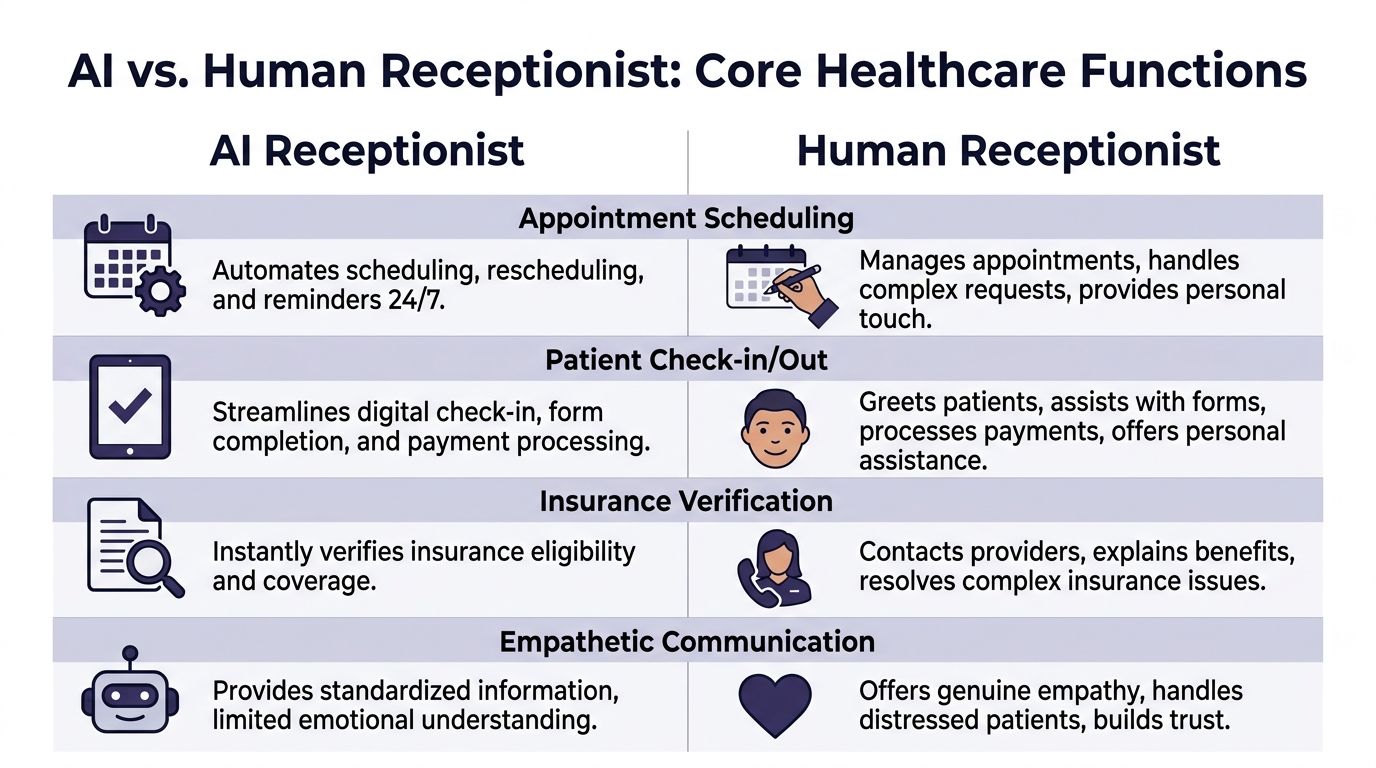
| Function | AI receptionist | Human receptionist | Our take |
|---|---|---|---|
| Patient communication | Fast, consistent, instant for routine requests | Better at reading emotion and handling distress | Use AI first for simple requests, human backup for sensitive calls |
| Scheduling | Handles booking, reminders, and rescheduling around the clock | Good for unusual scheduling constraints | AI should own standard scheduling workflows |
| Accuracy on routine tasks | Consistent, no fatigue, no skipped steps | Can make errors when rushed or interrupted | AI is usually better for repeatable admin work |
| Availability | 24/7, unlimited simultaneous calls | Limited by staffing, breaks, and shift coverage | AI wins decisively |
| Clinical nuance | Good when rules are clear | Better when symptoms, fear, or confusion enter the call | Human escalation is essential |
| Privacy and controls | Strong if configured correctly and monitored | Strong if staff are trained and follow process | Security depends more on system design than on human vs AI |
Patient experience is not just about being nice
A warm voice matters. So does speed.
For routine interactions, AI has a real edge. In healthcare reception tasks, AI reduced average call handling time from 4 to 6 minutes for humans to 90 to 120 seconds, handled unlimited simultaneous calls, and provided 24/7 access with zero hold times, according to NEMT Platform’s review of AI receptionist performance. That changes the patient experience fast, especially in practices where callers mainly want appointments, directions, refill routing, or basic instructions.
Humans still win on emotional range. A patient who is crying, confused, angry, or scared does not want a scripted loop. They want another person who can slow down, listen, and guide them. We have watched practices fail here by trying to force every call through automation. Patients do not hate AI. They hate feeling trapped.
Accuracy and clinical safety depend on the task
Front-desk work is full of simple tasks that become dangerous when rushed. Wrong date. Wrong provider. Wrong callback number. Wrong pharmacy. These are not dramatic failures, but they create downstream mess for clinical staff.
On routine interactions, the same NEMT source states that a PubMed analysis of 7,165 medical queries found AI responses more accurate and more professional than human clinicians across US and Australian systems. That does not mean AI should answer complex clinical questions on its own. It means repeatable workflows tend to benefit from machines that do not get tired, distracted, or interrupted.
A clear distinction must be made: if the issue is administrative and rule-based, AI should usually handle it. If the issue could affect triage, urgency, or patient safety, the system needs a clear path to a trained human.
The safest front desk is not “AI only” or “human only.” It is a system that knows which calls should never stay in automation.
HIPAA, security, and operational discipline
People often ask whether AI is safe enough for healthcare. That is the wrong question. The pertinent question is whether your workflow has good access controls, audit trails, role-based permissions, and monitored escalation.
A sloppy human process is not safer because a person is involved. We have seen front desks leave voicemails with too much information, write notes on paper, and rely on memory during peak call times. AI systems can reduce some of that chaos if they are built for healthcare and tied into the right processes. If your team is still early in operational automation, this primer on AI for efficiency and automating daily tasks is a useful way to think about where repetitive work belongs.
If you want to see what a healthcare-specific voice workflow looks like in practice, a virtual medical receptionist setup is one example of how clinics route scheduling, intake, and routine patient calls without forcing staff to live on the phone.
Availability and scale are where the argument ends
This is the easiest category. AI does not sleep, call out sick, or get buried at lunch. Human teams do.
That does not make humans less valuable. It means they should stop being the bottleneck for work a machine can do reliably. A good front desk redesign removes low-value call volume from staff so they can handle the moments that need them.
Calculating the true cost and ROI of each model
Most practices compare a receptionist salary to an AI subscription and stop there. That is sloppy math.
The true cost of a front desk includes payroll, benefits, training, coverage gaps, missed calls, after-hours leakage, and the appointment requests that disappear because no one answered fast enough. Once we map the full picture, the economics usually shift hard toward automation for routine work.
The hidden cost of a human-only front desk
A human receptionist is not just a wage line. It is also:
- Coverage gaps: Breaks, lunch, sick days, turnover, and uneven call surges all affect service quality.
- Training drag: Every new hire needs onboarding, supervision, and correction.
- Opportunity loss: If patients call after hours or abandon long holds, the revenue is gone.
- Task switching: Staff lose accuracy when they bounce between phones, check-in, and admin work.
We have seen practices miss the biggest cost because it does not show up cleanly in accounting. It sits in abandoned calls, incomplete registration, and unbooked visits.
The revenue capture gap is usually bigger than leaders expect
The financial case becomes compelling. According to Sully AI’s 2025 analysis of AI medical receptionists, AI receptionists capture 95% to 99% of potential appointments versus 70% for humans. The same analysis says AI operates 24/7, eliminating the 40% after-hours call miss rate tied to human staffing limitations.
That performance translated to an average of $420,000 in annual revenue per practice compared with $180,000 for humans, or $240,000 in additional annual revenue in the cited comparison. The same source also reports 1,018% ROI in Year 1 for a 50-employee business in the UK-based analysis.
You do not need your clinic to match those exact figures for the point to hold. If your current front desk misses calls, loses after-hours demand, or struggles to convert appointment intent into booked visits, your human-only model is already costing more than payroll suggests.
A better worksheet for decision making
We advise practices to estimate ROI using four buckets instead of one.
| Cost or value bucket | Human-only model | AI or hybrid model |
|---|---|---|
| Direct labor cost | Salary, benefits, training, coverage | Subscription, setup, oversight |
| Access loss | Missed calls, hold abandonment, after-hours leakage | Lower if AI answers every time |
| Admin efficiency | More manual scheduling and message handling | Better if routine tasks move to automation |
| Revenue capture | Lower if demand is missed or delayed | Higher if appointment requests convert faster |
One operational area where this often connects is the billing side. If your front desk chaos also feeds denial rates, eligibility problems, or weak intake data, work on both together. A strong healthcare revenue cycle optimization plan should sit next to your receptionist decision, not behind it.
If your ROI model ignores missed demand, it is not a real ROI model.
Our recommendation on cost
Small practices should not hire their way out of routine phone volume unless they have no other option. Larger groups should stop treating the front desk as a labor scheduling problem. It is a system design problem.
Use people for complexity. Use AI for volume. That is how you get the economics to work without wrecking patient experience.
Workflow integration and clinical safety
A front-desk tool that sits outside your normal workflow will create more work, not less. We have seen clinics buy impressive demos that collapsed the moment staff had to re-enter data into the EHR, clean up bad routing, or guess whether a patient issue was urgent.
The operational test is simple. Does the tool fit how the clinic runs on a Tuesday morning?

Three operating models we see in the field
Not every organization should deploy AI the same way.
Full replacement for routine front-desk calls
This works in narrow settings with high repetition and clear protocols. Think straightforward scheduling, intake, refill routing, and FAQs. It can work, but only if escalation is clean and fast.AI as the first line of defense
This is the model we recommend most often. AI answers every call, handles simple tasks, and passes anything sensitive, unclear, or high-risk to staff.Department-specific hybrid design
Larger systems often need something more structured. Primary care may route differently from imaging, behavioral health, or surgical scheduling. One call layer rarely fits all of them.
Integration is where the gains become real
If AI takes a message but your team still copies it into the chart, you did not fix the workflow. You added a middle step.
The useful version ties directly into your scheduling and record systems so information moves where staff already work. If you are evaluating vendors, ask about chart write-back, scheduling sync, refill workflows, and what happens when data is incomplete. This matters more than fancy voice quality. A practical example is EMR integration for healthcare call workflows, where the point is not novelty. The point is less duplicate work and fewer handoff errors.
Clinical safety lives in escalation rules
It is at this stage that many buyers become complacent. They ask, “Can the AI answer calls?” They should ask, “What exactly triggers transfer, alerting, or staff review?”
We advise clinics to define escalation in plain language:
- Urgent symptom language: Chest pain, shortness of breath, severe bleeding, suicidal statements, or rapidly worsening symptoms should never stay in a routine queue.
- Emotional distress: A distressed caller may not use clean medical language, which is why frustration, panic, and confusion should trigger human review.
- Repeated misunderstanding: If the caller has to repeat themselves or the system cannot confirm the request, route out.
- Benefit and authorization complexity: Insurance edge cases often need staff because real-world payer issues are messy.
A lot of leaders obsess over whether AI itself is “HIPAA safe.” That matters, but workflow discipline matters more. This plain-English guide to HIPAA compliance is written for another audience, yet it is still useful because the operational principles carry over. Know who can access what. Log actions. Limit exposure. Review failures.
The handoff is the safety feature. If your AI-to-human transfer is clumsy, the whole design is weak.
What we tell teams before go-live
Do not launch with every call type. Start with a narrow set of routine workflows. Test edge cases. Listen to failures. Tighten scripts, routing logic, and escalation rules. Then expand.
The clinics that get this right treat AI like a clinical operations project, not a phone project.
The impact on staff burnout and patient trust
The front desk is one of the hardest jobs in healthcare. It is repetitive, interrupt-driven, emotionally loaded, and often under-supported. If leaders only frame AI as a labor savings tool, they miss one of the bigger reasons to adopt it.
Used well, AI can make the receptionist role more human.

Burnout usually starts with volume and interruption
Reception teams burn out because they rarely control their workflow. They are expected to answer every call, check in patients, scan forms, explain balances, and manage provider schedule changes, often all at once.
That is why the staffing angle matters. According to OmniMD’s review of AI front desk models, AI adoption in healthcare support services surged 340% since 2020. The same source notes that pilot studies in US clinics report hybrid AI models can reduce receptionist hours by 40%, although long-term retention data is still emerging.
We should be honest here. We do not yet have strong longitudinal proof that AI directly fixes turnover. But we have enough operational evidence to say this: if you remove a large share of repetitive calls from a stressed front desk, staff get more breathing room and fewer context switches. In our work, that usually leads to better morale, better focus, and fewer “I can’t do this anymore” moments.
Trust improves when human time is used where it matters
Some leaders worry that AI makes the practice feel cold. That happens only when they deploy it badly.
If staff no longer spend their day repeating office hours, rescheduling routine follow-ups, and chasing basic intake details, they can do more of the work patients remember. Greeting people. Fixing problems. Calming fear. Sorting out a confusing insurance issue. Helping an older patient who does not understand the portal.
That is a better use of human skill.
Patient trust is not evenly distributed
Different patient groups react differently to automation. We have learned not to treat “patients” as one block.
A younger, busy patient may be perfectly happy with fast self-service. An elderly patient, someone with hearing difficulty, or someone under stress may want a person right away. The operational mistake is forcing both groups through the same path.
Here is the trust model that works best in practice:
- Be clear: Tell callers they are speaking with an automated assistant.
- Give choice early: Offer a human option fast, especially for sensitive issues.
- Protect the vulnerable: Build easy routing for distressed callers, older patients, and those who struggle with self-service.
- Review failures: Pull real call samples and look for frustration patterns.
AI should remove friction, not create a new kind of friction.
Our opinion on burnout and trust
If your front desk team is overloaded, a human-only model often harms trust more than AI does. Why? Because patients feel the stress. They sit on hold. They get rushed answers. They hear fatigue in the voice of the staff member who is trying to do five things at once.
A smart hybrid model can lower that pressure. That is the part many executives miss.
A decision framework for your healthcare practice
There is no universal answer. A rural primary care office, a multi-site urgent care group, and a hospital outpatient network should not make this decision the same way.
The right move depends on call volume, staffing pressure, patient demographics, and how much process discipline your organization can support.
For small to mid-sized practices
Our recommendation is simple. Use a hybrid model unless your call volume is tiny and stable.
A smaller clinic usually cannot afford missed demand, after-hours leakage, or a second full-time hire just to keep the phones under control. Hybrid AI gives these practices broader coverage without forcing them into a larger payroll commitment.
The best fit tends to look like this:
- AI handles routine intake and scheduling: This keeps the phones from owning the day.
- Staff handle exceptions and in-office care: The receptionist becomes less of a switchboard operator and more of a patient coordinator.
- Leadership reviews call categories monthly: Not every pain point needs automation. Focus on the high-volume repeat work first.
If you run a small practice, do not overbuild. Start with the tasks your staff complain about most often.
For large systems and multi-location groups
Bigger organizations usually have a different problem. They do not just need more coverage. They need consistency.
One site answers every call. Another site sends patients to voicemail. One clinic has clean scheduling rules. Another improvises. AI can help standardize the front door if leaders do the governance work first.
For larger systems, we advise:
| Decision area | What to look for |
|---|---|
| Standardization | Common workflows across sites, specialties, and scheduling teams |
| Routing logic | Rules by department, urgency, and patient intent |
| Oversight | QA review, escalation reporting, and call auditing |
| Inclusion | Language support, human fallback, and accommodation for vulnerable patients |
Demographics should drive your model
This part gets neglected, and it should not. According to EHMed’s analysis of AI vs human receptionists, patients ages 18 to 35 show 55% comfort with AI, while older patients often prefer humans. The same source notes that 20% of patients in major US and UK markets are Limited English Proficiency, which makes language handling and empathy a practical design issue, not a branding issue.
That means your patient mix should shape your setup.
If you serve a younger, digitally comfortable population, you can push more traffic into AI-first workflows. If you serve older adults, medically complex patients, or many patients with limited English proficiency, keep the human path obvious and easy.
Our blunt recommendation
If you are a small practice, buy access and consistency first. If you are a large system, buy standardization and oversight first. In both cases, do not buy a tool that tries to replace human judgment. Buy one that protects it.
Your next step is not a philosophy debate. Pull two weeks of call patterns, identify your top repeat requests, and decide which of those should never require a person to answer live.
Frequently asked questions about AI receptionists
Practice leaders usually ask the same questions once they move past the sales pitch. Good. They should. Front-desk automation affects patient access, staff morale, and risk.
How should AI handle a medical emergency
It should not try to “solve” it. It should recognize the issue, follow a predefined emergency script, and transfer or instruct according to clinic policy.
We advise practices to set hard triggers for emergency language and review those calls regularly. If a vendor cannot show you how urgent calls are flagged and handed off, keep looking.
What if a patient gets frustrated with the AI
Then the system should get out of the way.
A well-designed setup offers a human option quickly, especially after repeated confusion, distress, or failed verification. Bad AI traps callers in loops. Good AI exits early when the interaction is going poorly.
Can AI understand different accents and languages
Sometimes yes, sometimes not well enough. This is why you test with your actual patient population before broad rollout.
In multilingual or accent-heavy markets, do not assume voice quality in a demo reflects real-life performance. Use sample calls from your own environment. If your population includes many older adults or many patients with limited English proficiency, keep live support easy to reach.
Do patients like using it
Often, yes. According to Dental AI Assist’s analysis of patient response to AI receptionists, AI reception in healthcare shows 92% patient satisfaction, 78% prefer an instant AI response over being put on hold, and 85% of patients cannot distinguish a well-trained AI from a human in conversational flow. The same source also notes that a clear path to a human is necessary to keep trust.
That matches what we see. Patients usually do not object to AI itself. They object to delay, confusion, and lack of choice.
Will AI replace my front-desk staff
It should replace tasks first, not people first.
In healthy deployments, staff stop spending the day buried in repetitive phone work and spend more time on in-person service, exceptions, and higher-value coordination. If leadership uses AI only as a staffing cut, the rollout usually goes badly.
What tasks are safest to automate first
Start with the low-drama, high-volume work:
- Appointment scheduling: Standard bookings, rescheduling, cancellations, and reminders
- Basic intake: Demographics, callback details, and simple reason-for-visit capture
- Refill routing: Request collection and routing based on clear policy
- Office information: Hours, directions, and routine preparation instructions
Save emotionally loaded, unusual, or clinically ambiguous interactions for people until your team has strong confidence in the system.
What should we measure after launch
Skip vanity metrics. Watch operational behavior.
Use a scorecard that includes:
- Call answer performance: Are fewer callers hitting voicemail or dropping off?
- Conversion quality: Are appointment requests turning into booked visits?
- Escalation quality: Are urgent or confusing calls getting to the right person fast?
- Staff feedback: Do reception teams say the workload is getting easier or just different?
What is the biggest mistake practices make
They buy software before they define workflow.
If your scheduling rules are messy, your escalation paths are unclear, and no one owns QA, AI will expose those weaknesses fast. The technology is rarely the whole problem. The process usually is.
If your practice is missing calls, overloading staff, or struggling to give patients fast access without adding more headcount, it is worth looking at Simbie AI. It is a healthcare-focused voice AI platform built to handle routine front-desk work such as scheduling, intake, refill requests, and patient communication while fitting into clinical workflows. The smartest next move is not a full rip-and-replace. It is a short operational review of your current call flow, escalation rules, and front-desk bottlenecks so you can see where AI should take work off your team and where people should stay firmly in control.