
A missed CMS-460 can turn into a revenue problem. I've seen new providers get enrolled, start seeing Medicare patients, and only later realize nobody ever made the participation election. At that point, the issue isn't the paper. It's the months of cleanup, the avoidable payment gap, and the staff time spent figuring out what should have been decided during onboarding.
That's why I don't treat CMS 460 forms as low-level admin work. They belong in the same conversation as credentialing, payer setup, and front-desk readiness. If your practice handles them well, Medicare participation becomes predictable. If you treat them like an afterthought, the downstream mess hits billing, scheduling, and patient estimates all at once.
The CMS-460 is more than a form it's a financial decision
A physician joins the practice, credentialing clears enrollment, the schedule fills, and Medicare patients start coming in. Then billing notices the participation election was never finalized. At that point, the problem is no longer a missing form. The practice is dealing with preventable reimbursement confusion, patient billing questions, and staff time that now goes to cleanup instead of clean claim flow.
That is why I treat the CMS-460 as an operating decision tied directly to revenue. It affects how Medicare claims are paid, how front-desk staff quote patient responsibility, and how consistently the billing team can work accounts without manual exceptions.
Practices get into trouble when enrollment, credentialing, and billing treat this as somebody else's task. Enrollment gets the provider into Medicare. The CMS-460 records how that provider will participate. If those steps are not tied together in onboarding, errors show up later in remits, patient statements, and write-off reviews.
I advise offices to build the CMS-460 decision into provider setup the same way they handle tax IDs, group reassignment, and payer effective dates. It belongs in a documented onboarding checklist, in the credentialing tracker, and in the billing handoff. Teams that want tighter administrative control usually benefit from treating it as part of a broader healthcare revenue cycle optimization process, not as a standalone paper task.
One practical rule keeps teams out of trouble. If a provider is ready to see Medicare patients but the CMS-460 decision is still unresolved, onboarding is not complete.
The form itself is short. The downstream financial effect is not.
What it means to be a participating provider
A physician starts seeing Medicare patients on Monday. By Friday, the front desk is fielding balance questions, billing is checking remits twice, and no one is fully sure whether the provider was set up as participating or non-participating. I have seen that exact cleanup cycle start with one missed participation decision.
A participating provider under Medicare Part B agrees to accept assignment on all covered claims for Medicare beneficiaries. Operationally, that means the practice accepts the Medicare-allowed amount as payment in full for covered services, aside from the patient's deductible, coinsurance, and any noncovered items. The label sounds administrative. The impact shows up in claim handling, patient estimates, and write-off reviews.
The financial difference matters, but the workflow difference usually hits first. Participating status is tied to the higher Medicare payment amount available under the program rules for covered professional services and certain other listed services. More important for day-to-day operations, it gives staff one consistent rule to follow. Claims go out under assignment. Patient responsibility is easier to explain. Billing staff spend less time sorting exceptions provider by provider.
Here is how that choice plays out inside a practice:
- Front desk scripting gets simpler. Staff can quote responsibility without guessing whether assignment rules vary by clinician.
- Claim follow-up is cleaner. Billers are not stopping to verify participation status when a payment looks off.
- Patient statements are easier to defend. The amount due is less likely to trigger calls that start with, “Why is Medicare showing something different?”
- Multi-provider groups avoid inconsistency. One physician set up as PAR and another left non-PAR by mistake creates preventable confusion in scheduling, billing, and reporting.
Non-participating status is not automatically wrong. Some providers make that choice deliberately based on reimbursement strategy, specialty mix, or practice model. But in small and midsize offices, I usually see non-PAR status happen by omission, not planning. That is a process failure, not a strategy.
The timing is where practices lose control. A newly enrolled provider does not become participating just because PECOS enrollment is complete. The participation election has to be made and tracked. If no one owns that step, the problem surfaces later in claim payments and patient billing.
This belongs in the same operational bucket as rendering setup, payer enrollment status, and effective-date validation. Practices using medical billing software for small practices should build a required participation-status checkpoint into onboarding and keep it visible to credentialing, scheduling, and billing. The best setup is simple. No Medicare appointment slots open until the participation decision is documented and handed off correctly.
Participating status is a revenue-cycle setting with patient-facing consequences. Treat it that way.
Who needs to file CMS 460 forms
Not every provider files a CMS-460 because they have to. They file it because they want participating status under Medicare Part B. That distinction matters.
If you're dealing with a newly enrolled clinician, the default is not participating unless the form is submitted. So the better question isn't “Who is required to complete this form?” It's “Who needs to make an active Medicare participation choice?”
Provider types that commonly need the form
These groups are the ones I tell practices to review first:
- Physicians: MDs and DOs who are enrolling in Medicare and want to elect participating status.
- Non-physician practitioners: Nurse practitioners, physician assistants, and similar practitioners who bill Medicare under their own enrollment.
- Therapy providers: Physical therapists, occupational therapists, and speech-language pathologists should review participation status as part of enrollment setup.
- Suppliers: Certain suppliers, including DMEPOS suppliers, need to pay very close attention to timing and submission rules.
The real operational point
A lot of office teams think “credentialed” means everything is done. It doesn't. A provider can be enrolled and still sit in the wrong participation status because no one submitted the election form.
That's why I tell administrators to put CMS 460 forms in the same bucket as payer effective dates, tax ID mapping, and rendering-provider setup. It's not optional if the practice wants PAR status. It is the actual opt-in step.
A quick way to think about it
Use this simple split during onboarding:
| Situation | What it means |
|---|---|
| New provider enrolled with Medicare, no CMS-460 submitted | Provider defaults to non-participating |
| New provider enrolled with Medicare and CMS-460 submitted | Provider has elected participating status |
| Existing supplier or provider reviewing status change | Timing rules may limit when the change can take effect |
If you manage multiple specialties, don't assume one provider category works differently just because internal workflows differ. The practical rule is the same. If someone wants Medicare participating status, someone has to make sure the form gets done and sent correctly.
A field-by-field guide to the CMS-460 form
A physician starts seeing Medicare patients, claims go out, and the payment picture is not what the practice expected. A lot of the time, the problem traces back to one short participation form that was filled out quickly and never checked against the enrollment record.

The CMS-460 is easy to underestimate. It has only a few fields, but those fields have to line up with the data already sitting in PECOS, your credentialing files, and often your EMR provider master. If they do not match, staff end up chasing signatures, correcting records, and explaining delays that could have been prevented with a three-minute review.
Participant name and address
Enter the participant name and address exactly as they appear on the related Medicare enrollment record. Use the same legal name, the same entity wording, and the same address format.
Offices often create avoidable problems. Front-desk staff may use the practice name patients recognize. Credentialing may use the legal entity name. The EMR may hold an older suite number. If the CMS-460 pulls from the wrong source, the form can get flagged even though the practice believes the information is correct.
For groups with centralized onboarding, the fix is simple. Build the form from the same source file your enrollment team used, not from a spreadsheet someone keeps on a shared drive.
NPI and identifying details
The NPI has to match the provider or supplier tied to the enrollment record. In a single-provider office, that is usually straightforward. In a multi-specialty group, it is one of the most common failure points because staff may have both individual and organizational NPIs in circulation across different systems.
Check the NPI against the credentialing record before the form is signed. Do not rely on memory, a billing roster, or an old copy of another provider's paperwork.
If your practice uses onboarding templates, add a hard stop in the workflow so the person preparing the form confirms which identifier belongs there. That small control prevents expensive clean-up later.
Signature and date
The signature and date section deserves more attention than teams usually give it. An incomplete signature block, a missing date, or the wrong signer can stall the form even when every other field is accurate.
As noted earlier in Medicare contractor guidance, the identifying information, signature, and related details need to match the enrollment file closely. In practice, that means the office should confirm signer authority before the form goes out, not after it comes back.
I also recommend logging who signed and when in the same tracking tool you use for payer enrollment. If your team works out of an EMR task queue or an onboarding checklist, add CMS-460 signature capture as a discrete task instead of treating it like loose paper.
Returned forms usually reflect a process failure inside the practice, not a confusing form. The information came from the wrong source, no one verified the signer, or the final review never happened.
What to check before submission
A short checklist catches the errors that cost the most time to fix:
- Name match: Compare the participant name to the Medicare enrollment record, not the HR system or marketing name.
- Address match: Use the same address format already on file.
- NPI check: Confirm the correct identifier from the verified enrollment source.
- Signer review: Make sure the person signing has authority for that individual or entity.
- Date check: Confirm the form is dated and readable before submission.
What does not work
The weak process is familiar. Someone prints the form, fills in part of it by hand, scans it, and sends it without checking the CMS-855 record or the provider setup file. That feels fast for about a day. Then the billing team, credentialing team, and provider all lose time fixing a preventable mismatch.
The stronger process is operational, not clerical. Pull the enrollment record first, complete the CMS-460 from that source, route it for the correct signature, and require a second review before submission. If your practice manages onboarding through software, turn those steps into assigned tasks with due dates and document storage. That is how a paper form stops being a recurring revenue problem.
Annotated sample of a completed CMS-460 form
A sample form helps more than a long explanation because most mistakes are visual. The spacing looks right, the signature is there, and the team assumes the document is fine. Then one detail doesn't match the enrollment file.
Use the sample below as a comparison tool, not as a template to copy blindly. Put your blank form next to it and check the identifying fields line by line before submission.
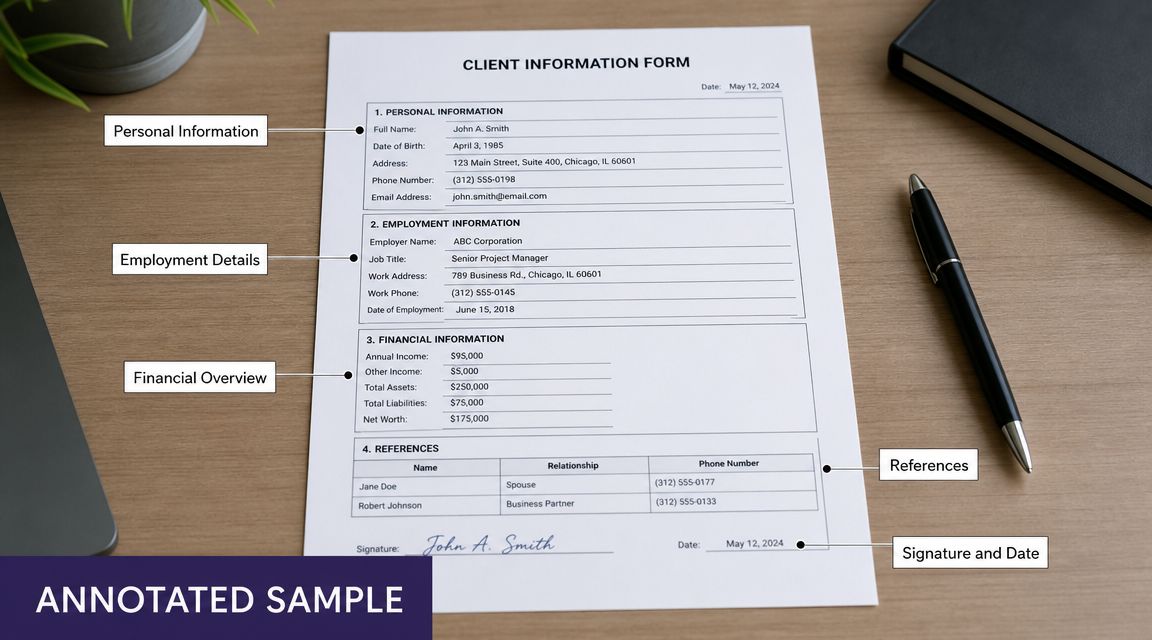
A few points deserve extra attention:
- The participant details must match the enrollment record exactly, including naming format and address details.
- The NPI should be verified against the same source your enrollment team used.
- The signature block must be complete and handled by the right person.
- The date should be checked before sending so the form doesn't get held up over a simple omission.
I keep a marked-up sample in onboarding documentation for every billing team I train. It cuts down on “looks correct to me” reviews, which are often the least useful kind.
Submission requirements and critical deadlines
A form can be accurate, signed, and ready to go, then still cost the practice money because it was sent to the wrong contractor or filed after the decision window closed. I see this happen during onboarding more than it should, especially when credentialing, billing, and HR are each tracking a different version of the provider setup.
The CMS-460 is submitted to the provider's or supplier's Medicare Administrative Contractor, or MAC. Staff should confirm the correct MAC from the enrollment record already on file. Guessing, or pulling the contractor from an old spreadsheet, is how forms end up in the wrong queue.
The deadlines that matter
Newly enrolled physicians, practitioners, and suppliers have a limited window to make their participation election after enrollment. Miss that window and the practice may have to wait for the next available opportunity to change status, which affects reimbursement planning and patient collections.
DMEPOS suppliers need even tighter calendar control. Their participation changes usually follow the annual enrollment cycle, and late paperwork can push the effective date out longer than the practice expected. That matters if leadership is counting on a status change for the next calendar year.
The practical rule is simple. Tie the CMS-460 deadline to the provider enrollment timeline the day the enrollment file is opened. Do not wait until the provider is credentialed, scheduled, or already seeing Medicare patients.
How to keep submission from turning into a cleanup project
Treat the form like an operational milestone, not an isolated document.
- Assign one owner: One person should be responsible for confirming the MAC, sending the form, and saving proof of submission.
- Build it into onboarding: Add the participation election to the same checklist used for Medicare enrollment, payer setup, and provider start-date readiness.
- Store proof in one place: Keep the sent form, confirmation, and any follow-up notes in the same record the billing team and credentialing team can both access.
- Use deadline controls: Calendar the election window and set reminders early enough to fix rejects before the window closes.
Practices that already use EMR workflow integration for administrative tasks should put the CMS-460 into that same workflow. The best setup creates a task when enrollment starts, routes it to the right owner, and requires confirmation before the provider is marked ready for Medicare billing.
The best submission process is boring. It has an owner, a checklist, and a place where the confirmation lives.
What breaks the process is usually not lack of knowledge. It is split ownership. Credentialing knows the enrollment date, billing knows the claim impact, and operations assumes someone else sent the form.
Fix that handoff, and deadlines stop slipping through the cracks.
Common CMS-460 errors that can cost your practice
A provider starts seeing Medicare patients on Monday. Two weeks later, billing notices reimbursement does not match what the practice expected. The problem is not clinical, and it is not a claims issue. The participation election was handled incorrectly, and now the office is stuck fixing paperwork after revenue has already been affected.

Mismatch between the form and the enrollment record
This is one of the costliest errors because it looks harmless. A provider name does not match the enrollment file exactly. The practice address comes from an old location record. Staff pull the NPI from the wrong profile in the PM system or credentialing spreadsheet.
Those small differences create rework fast. Staff have to compare versions, confirm which provider record is correct, and resend documentation. In a busy office, that usually means delayed follow-up and confusion between credentialing, billing, and operations.
The fix is simple. Complete the CMS-460 from the same provider dataset used for Medicare enrollment, not from a separate spreadsheet, inbox thread, or memory.
Signature problems
Signature errors are still common, especially in group settings where administrative staff handle a high volume of forms. I usually see one of three issues: the wrong person signs, the date is missing, or the signature process does not match how the rest of the enrollment paperwork was handled.
Paper habits collide with modern operations. If your office uses e-sign tools, delegated document prep, or centralized credentialing support, someone still needs to confirm who is allowed to sign this specific form before it goes out. A fast signature from the wrong person is slower than no signature at all because it creates a rejection cycle.
Missed timing
Some practices complete the form and never submit it. Others submit it after the applicable window because it sat in a queue waiting for review.
That mistake often starts upstream. The provider was added to the schedule, payer loading moved ahead, and everyone assumed Medicare participation had already been finalized. By the time billing sees the issue, the office is dealing with payment consequences instead of preventing them.
Treating CMS-460 as a stand-alone document
A separate form invites separate ownership, and separate ownership is where errors grow.
If credentialing prepares the form, billing expects it to be done, and operations marks the provider ready, nobody is managing the full decision path from enrollment to claims. The paper form is only one step. The operational question is whether your systems force the team to confirm participating status before the provider is released for Medicare billing.
In well-run offices, CMS-460 status shows up in the same workflow as enrollment, payer setup, and provider readiness. If it lives outside that process, it gets missed.
Using outdated records or duplicate provider profiles
This problem shows up more often in multispecialty groups and organizations with several practice locations. A provider may have more than one internal profile, an old correspondence address, or duplicate onboarding records across HR, credentialing, and billing systems.
Staff then complete the form with data that looks familiar but is not the official one tied to the enrollment record. That is how practices end up correcting avoidable errors after submission.
A clean workflow helps here. One official provider record should feed the form, and staff should know exactly where that record lives.
What actually works
The offices that avoid repeat mistakes usually follow the same controls:
- Use one official provider record: Pull the name, address, and NPI from the same approved enrollment file every time.
- Add a second review: Have another staff member verify the identifying fields, signature, and date before submission.
- Assign clear accountability: One person owns completion, submission, and confirmation, even if several teams touch the process.
- Store proof where both billing and credentialing can see it: Do not leave the final form or confirmation in a personal email folder.
- Check participation status before Medicare billing starts: Clinical readiness and scheduling readiness are not the same as Medicare participation readiness.
These steps are not complicated. They are operational controls. Put them in place, and the CMS-460 stops being a recurring cleanup item and becomes a predictable part of provider onboarding.
How to integrate form management into your practice workflow
The paper form is the easy part. The hard part is building a process so the same mistake doesn't happen again with the next provider.

I've had the best results when CMS 460 forms are folded into a single provider onboarding workflow that includes credentialing, Medicare enrollment, payer loading, scheduling release, and front-office scripting. If you split those tasks across too many teams without a shared checklist, the form gets lost between handoffs.
Build a simple control point
You don't need fancy software to fix this. A disciplined checklist inside your practice management system, credentialing tracker, or shared operations workspace is often enough.
Use a required checkpoint such as: “Medicare participation decision confirmed.” That task should not close until the office has documented one of two outcomes. Either the CMS-460 was submitted, or the provider intentionally chose not to elect participating status.
Put reminders where staff already work
The mistake I see all the time is storing deadline reminders in one person's calendar. That works until that person is out, leaves the practice, or assumes someone else handled it.
Instead, build reminders into the workflow your team already touches:
- New provider onboarding lists in the practice management system
- Credentialing trackers used by billing and enrollment staff
- Shared calendars for annual participation review periods
- Front-desk readiness checks before a provider is opened for booking
A form is manageable. A hidden form is not. If the task lives outside the team's daily workflow, it will eventually be missed.
Connect participation status to patient-facing work
This is the operational link many practices miss. Participation status affects more than billing. It can shape how your team verifies coverage, estimates patient responsibility, and explains Medicare billing to patients before the visit.
That means the cleanest process is one where provider participation status is visible to the teams answering calls, registering patients, and checking benefits. If those teams are guessing, billing will pay for it later.
Frequently asked questions about CMS 460 forms
Can a non-participating provider become participating in the middle of the year
Usually, practices should not assume they can change status whenever they want. Timing rules apply, and suppliers in particular face a defined annual participation window through their MAC guidance. If you're considering a status change, check the applicable contractor instructions before planning around a mid-year switch.
Is the CMS-460 the same thing as the CMS-855
No. They are related, but they do different jobs. The CMS-855 handles Medicare enrollment information. The CMS-460 handles the participation election. Practices often bundle them in the same onboarding project, which is fine operationally, but they are not interchangeable documents.
What if a provider works with more than one practice
Treat each enrollment and billing arrangement carefully. Don't assume one participation decision automatically answers every operational scenario across locations or entities. In group settings, I always recommend reviewing how the provider is enrolled and billed in each setup before making assumptions.
Who should keep the final copy of the form
The best answer is not “who,” it's “where.” Keep the completed form and proof of submission in the provider's enrollment record where billing, credentialing, and compliance staff can all find it. If only one person has it in email, your office will waste time later.
What's the fastest way to avoid mistakes with CMS 460 forms
Slow down at the right moment. Pull the enrollment record, complete the form from that record, verify the signature, confirm the MAC, and document submission. Most problems come from skipping one of those checks because the form looks too simple to deserve a process.
If your practice wants fewer missed enrollment tasks, cleaner handoffs, and less admin cleanup around provider setup, Simbie AI is worth a look. It helps healthcare teams automate repetitive operational work, connect workflows with existing systems, and reduce the kind of gaps that turn small paperwork misses into billing headaches.