
Most practices don’t start looking at automated appointment scheduling for doctors because they love new software. They start because the front desk is stuck in a loop. Phones keep ringing, patients at the window get impatient, refill requests land at the same time, and one staff member’s lunch break turns into a backlog that lasts all afternoon.
I’ve seen that pattern across dozens of rollouts. The scheduling problem usually looks small from the outside. It’s “just appointments.” In reality, it’s a daily pileup of call handling, provider rules, cancellation gaps, reminder follow-up, and manual workarounds that nobody has written down but everyone depends on.
That’s why practices that succeed with automation don’t treat it like an IT purchase. They treat it like an operating change. The software matters. The workflow design matters more.
The Hidden Costs of Manual Patient Scheduling
Manual scheduling creates waste long before anyone notices it on a report. A patient calls during work, sits on hold, gives up, and tries another clinic. A cancellation opens at 8:10 a.m., but nobody has time to call the waitlist until after lunch. A staff member books the wrong visit type because they’re juggling three screens and a line at the front desk.
That friction adds up fast. Missed appointments cost the U.S. healthcare system over $150 billion annually, and outpatient no-show rates can reach 18.8%, according to Prospyr’s review of AI scheduling outcomes. That’s not just a revenue issue. It’s a staffing issue, an access issue, and often a patient experience issue.
Practices usually feel the problem in smaller ways first:
- Front desk overload: Staff spend large chunks of the day answering the same booking and rescheduling questions.
- Uneven schedules: Providers run behind one day, then stare at empty slots the next.
- Patient drop-off: People who can’t get through by phone often don’t try again.
- Burnout risk: The scheduling team absorbs every exception, every complaint, and every late change.
Practical rule: If your scheduling process depends on a few experienced people “just knowing how it works,” you don’t have a stable process. You have a fragile one.
Automation can help, but only if the practice uses it to fix the work itself. If you’re trying to boost efficiency with automation, scheduling is often the first place where the gains are visible because every patient touches it and every staff member feels it.
The calm version of the same practice looks different. Patients book after hours without waiting for the office to open. The system sends reminders and handles basic changes. Staff stop acting as human switchboards and start handling the exceptions that require judgment. That shift is what makes automated appointment scheduling for doctors worth doing.
Preparing your practice for automated scheduling
Before you look at vendors, map the mess thoroughly. Most practices skip this because they want relief fast. I understand that. But if you automate a broken flow, you just make the errors happen faster.

Start with the real workflow, not the policy manual
Ask your schedulers and front desk staff to walk through a normal day. Then compare that to what your SOP says. Those two versions rarely match.
Write down:
- How new patients book now
- How established patients reschedule
- Which visit types are simple
- Which bookings need chart review, insurance checks, or staff approval
- Where delays happen most often
Don’t overcomplicate this. A whiteboard works. So does a shared doc. The point is to surface the unofficial rules, because those rules are what the software will either support or break.
I also tell practices to flag every point where staff leave the scheduler and open another system. Those are the hidden handoffs that eat time and create errors.
Decide what you’re actually trying to fix
A bad project starts with “we need online scheduling.” A better project starts with a narrower operating target.
Examples of useful goals:
- Reduce phone pressure: Shift routine booking, canceling, and rescheduling out of the call queue.
- Fill holes faster: Use waitlists or booking logic to recover cancellations.
- Improve accuracy: Cut back on wrong visit types and mismatched provider bookings.
- Reduce admin drag: Move repetitive intake and scheduling tasks out of staff hands where it makes sense.
There’s a staffing reason to take this seriously. According to AJMC’s discussion of algorithmic scheduling, algorithmic overbooking and smart scheduling give staff “clear information” for faster slot-filling and reduce how often physicians need to check their own schedules. The same source notes that AI agents handling the full cycle from intake to EMR sync can cut administrative costs by up to 60%.
That doesn’t mean every practice gets that result. It means the upside is real if the operating model changes with the tool.
Separate automatable visits from judgment calls
Many rollouts often falter. Practices try to automate everything on day one, then staff lose trust because the system books cases that should have been reviewed first.
Use four buckets instead:
| Visit type | Good fit for automation | Needs guardrails | Human review first |
|---|---|---|---|
| Routine follow-up | Yes | Sometimes | Rarely |
| Straightforward sick visit | Often | Yes | Sometimes |
| Annual wellness or preventive visit | Often | Yes | Rarely |
| Complex specialty consult | Sometimes | Often | Often |
| Procedure or multi-step visit | Rarely | Yes | Usually |
That list doesn’t need to be perfect. It needs to be usable.
The cleanest rollouts start narrow. One provider group, a small set of visit types, and rules staff can explain without reading a manual.
Build a short requirements sheet
This should fit on one page. If it turns into a giant committee document, nobody will use it.
Include:
- Scheduling rules: provider, location, visit type, slot length, buffers
- System needs: EMR sync, reminders, waitlist handling, phone and web booking
- Patient access needs: mobile use, simple steps, support for patients who prefer phone
- Exception handling: manual review triggers, urgent escalations, blocked slots
For practices that want a broader view of how to scope business process change before they buy tools, I often point them to Prometheus Agency’s automation guide. It’s useful because it keeps the focus on process design, not software features alone.
How to select the right scheduling software
Vendor demos make everything look easy. Real clinics don’t. That’s why software selection should feel less like shopping and more like stress testing.
The biggest mistake I see is buying a scheduling front end that looks clean but sits loosely on top of the EMR. If availability isn’t fully synced, staff will spend their days fixing double bookings, stale slots, and patient confusion.
What matters more than the feature sheet
The most useful systems do three things well. They read your schedule accurately, apply your rules consistently, and make booking simple enough that patients finish the task.
More advanced products can go further. According to the AJMC paper on electronic appointment systems, advanced systems use provider-specific models based on historical data to recommend double-bookings, connect with systems such as EMR and billing to resolve conflicts, and run automated waitlists that match cancellations in real time.
That’s the difference between a digital request form and a true scheduling engine.
Vendor selection criteria for automated scheduling
| Criteria | What to Look For | Red Flags to Watch For |
|---|---|---|
| EMR integration | Two-way sync with real-time availability and status updates | “We can export a file” or batch syncing only |
| Booking logic | Provider, location, visit type, slot length, and exception rules | Generic templates that ignore specialty workflows |
| Patient experience | Mobile-friendly booking with very few steps | Long forms, forced logins, confusing pathways |
| Phone access | Voice-based scheduling or strong call handling options | App-only model for all patients |
| Waitlist and cancellations | Automatic backfill tools and clear cancellation logic | Staff must manually chase every opening |
| Security and compliance | Clear HIPAA controls and auditability | Vague answers on access, logging, or data handling |
| Reporting | Booking source, completion, no-show, and fill-rate views | No usable operational dashboard |
Run a demo using your worst scheduling scenarios
Don’t ask the vendor to show a “typical patient.” Give them the cases your team struggles with:
- a new patient with the wrong booking history in the chart
- an established patient who needs a longer follow-up
- a procedure slot with prep instructions
- a cancellation that should trigger a waitlist fill
- a provider with unusual template rules
If the demo can’t handle your ugly cases, it won’t survive Monday morning.
I also recommend looking at both web-first and voice-first options. Some practices need an online self-scheduling path. Others need phone automation because their patients still call first. If you’re comparing tools in that category, patient scheduling software options should be judged on how they handle real booking rules, not just how friendly the interface looks in a polished demo.
One side note that matters more than people think. If you’re spending money to drive more new-patient demand through search or paid ads, weak scheduling flow will waste that spend. That’s why I often tell owners to think about the handoff from marketing to booking. A resource like PPC management for small businesses is useful in that context because more leads only help if patients can book without friction.
Implementing the system and redesigning workflows
The go-live date is not the finish line. It’s the point where your old habits collide with your new system.
Change the role before you change the script
Front desk teams often hear “automation” as “less control” or “less job security.” If leadership ignores that, the rollout stalls. Staff keep bypassing the tool, patients get mixed messages, and every glitch becomes proof that the old way was better.
The better frame is this. Staff are no longer there to manually touch every routine booking. They’re there to manage exceptions, support patients who need help, and protect schedule quality.
That role shift needs plain language and repetition.
“For routine bookings, we want the system to do the repetitive work. We want staff focused on problems the system shouldn’t solve alone.”
Use scripts that sound human
Staff need words they can naturally say at the desk or on the phone. Not corporate lines.
Try scripts like these:
- For a patient calling to book: “We can book that for you now, and next time you can also use our self-scheduling option any time, even after hours.”
- For a patient in the office: “If you’d like, we can show you the fastest way to reschedule from your phone so you don’t have to call next time.”
- For a patient who prefers phone help: “That’s fine. We still have phone booking available, and we can help with that.”
Keep it short. Patients don’t need a speech. They need a simple next step.
Build an exception path on purpose
Every practice has appointments that don’t fit tidy rules. If you don’t define the exception path, staff invent one.
I like a simple escalation map:
- Routine appointment books automatically
- Rule conflict gets routed to designated scheduler
- Clinical uncertainty goes to nurse or provider review
- Urgent issue bypasses routine scheduling flow entirely
This is also the point where workflow automation around scheduling starts to matter. Teams that connect booking, reminders, intake, and chart updates tend to have fewer handoff errors than teams that automate only the front-end calendar. If you’re reviewing what that broader setup looks like, workflow automation in healthcare is the right category to evaluate, especially for practices trying to cut manual re-entry.
Protect the launch from predictable failure points
A lot of implementation pain is not mysterious. We already know where these projects break. According to Anzolo Med’s review of online scheduling failures, common problems include integration failures that cause booking errors, and confusing user interfaces that push abandonment rates over 50%. The same source notes that success depends on targeted patient communication, not just the software setup.
My own rollout checklist usually includes:
- Template cleanup: Fix provider templates before sync goes live.
- Rule review: Test each visit type against real scheduling scenarios.
- Ownership: Name one operational owner, not a committee.
- Manual fallback: Decide who fixes failed bookings on day one.
- Daily review: Check exceptions every day during early launch.
What works is boring, disciplined work. Most of the damage comes from rushing the middle.
Launching your system and driving adoption
A scheduling system nobody uses is just an expensive side door. Adoption needs its own plan.
I prefer a phased launch because it gives staff room to learn and gives leadership real feedback before the whole practice depends on the new flow. Start with one provider, one location, or one limited set of visit types. Fix what breaks there. Then expand.
Put the new booking path everywhere patients already look
Practices often bury self-scheduling on a subpage and then wonder why usage is low. Patients won’t hunt for it.
Place the booking option in all the obvious places:
- Website header: A visible “Book an appointment” action on every main page
- Google Business profile and social pages: Keep booking directions consistent
- On-hold messaging: Tell callers they can book or change routine visits without waiting
- Waiting room handouts: Give patients a simple, plain-language how-to
- Post-visit follow-up: Include the booking path in routine messages
Say what patients care about
Most patients don’t care that you bought software. They care that booking is easier.
Use language like:
“You can book routine appointments any time, including after office hours.”
Or:
“Need to reschedule? Use the quick booking option instead of waiting on hold.”
That’s clearer than “We’ve launched a new digital patient access experience,” which sounds like nobody you know.
Don’t build for app users only
This part gets missed all the time. If your rollout assumes every patient wants to tap through a mobile flow, you’ll leave people behind. Older patients, low-tech patients, patients with limited internet access, and patients who prefer speaking out loud still need a path that works.
That’s why automated appointment scheduling for doctors shouldn’t stop at a web form. According to Harlem World Magazine’s equity discussion, voice AI for phone-based booking can handle calls around the clock without requiring digital literacy and may cut no-shows by 15% to 20% in diverse clinics.
For practices trying to support both convenience and follow-through, appointment reminders matter too. Booking is only half the job. The follow-up process after booking affects whether the patient arrives, confirms, or reschedules in time. That’s why many clinics pair scheduling changes with patient appointment reminders, especially during the first months after launch.
A fair rollout gives patients options. Web if they want it. Phone if they need it. Staff help when the case is messy.
Measuring success and avoiding common mistakes
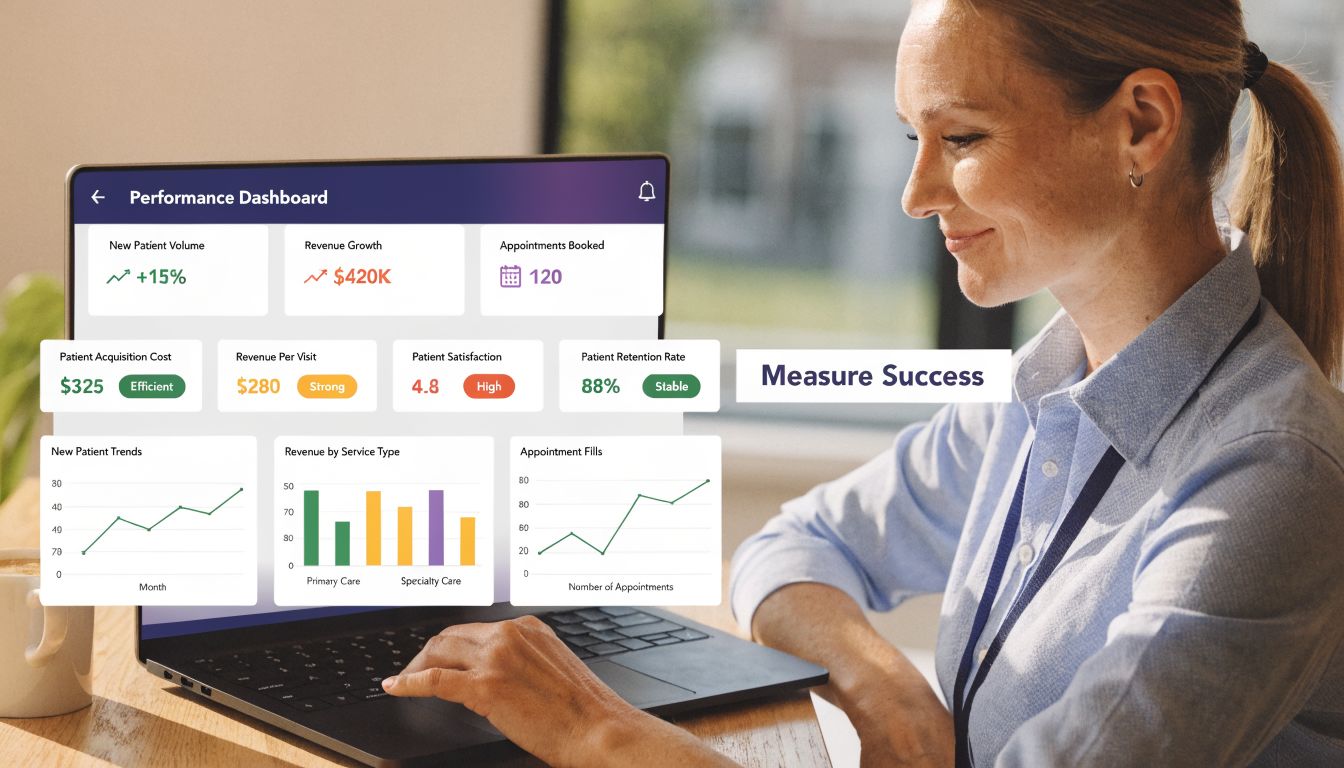
Most practices can tell within a few weeks whether the new system feels better. That’s useful, but it’s not enough. You need a short operating dashboard that proves what changed and shows where the rollout is slipping.
Measure the schedule, not just the software
I care less about login counts and more about operating results. Track the few metrics that tell you whether patients got access faster and staff got time back.
A simple dashboard should include:
- Booking source: phone, web, portal, or voice
- Completion rate: booked, canceled, rescheduled, no-show
- Time-to-fill: how long open slots stay unfilled after cancellations
- Exception volume: how many bookings need staff correction
- Call burden: whether routine scheduling calls are dropping
- Patient feedback: confusion points, failed steps, or common complaints
If your system has a waitlist feature, watch it closely. It’s one of the clearest indicators that automation is helping access. In a large health system, an automated waitlist process generated over 1 million appointment offers in a year, and the median time from waitlist entry to a self-rescheduled appointment was 10.2 days, according to this PubMed Central report on waitlist automation.
That kind of measure is useful because it connects the technology to something patients feel, which is faster access.
Fix the mistakes that repeat
The most common failures after launch usually aren’t technical bugs. They’re management misses.
Here are the ones I see most often:
| Mistake | What it causes | What to do instead |
|---|---|---|
| Rules are too rigid | Staff bypass the system | Loosen nonessential restrictions and review edge cases weekly |
| Staff training is one-time only | Old habits come back | Revisit scripts and exception handling after launch |
| Provider templates drift | Booking errors pile up | Assign template ownership and audit changes regularly |
| Patients don’t know the option exists | Adoption stays low | Keep promoting booking in calls, messages, and on-site signage |
| Leadership tracks nothing useful | Problems stay anecdotal | Review the dashboard every week at first |
If the team keeps saying, “The system doesn’t work,” ask which rule failed, for which visit type, under what condition. Vague complaints hide fixable problems.
Treat rollout as ongoing operations
This is the part too many groups skip. Automated scheduling isn’t a one-time install. Providers change hours. New visit types get added. Insurance rules shift. Front desk staff turn over. If no one owns the system after launch, it degrades.
My recommendation is simple. Assign one operations lead. Have that person review exceptions, failed bookings, and patient complaints on a set schedule. Bring providers in only when the issue is clinical or template-related. Everything else should stay operational.
That discipline is what turns a decent launch into a durable one.
If your practice is trying to cut call volume, reduce scheduling friction, and give patients a phone-based option alongside digital booking, Simbie AI is one tool to evaluate. Its voice agents handle routine scheduling tasks, connect with EMR workflows, and fit practices that need automation without forcing every patient into an app-only experience.