
Monday at 8:07 a.m. is where most ophthalmology scheduling problems show up.
The phones are already backed up. A cataract patient wants to confirm arrival time. A glaucoma follow-up needs the right provider and the right testing block. Someone is standing at the desk trying to check out while another patient asks whether they can fit in an urgent visit this week. Your front desk is not failing. The system around them is.
We have overseen AI scheduling rollouts in ophthalmology clinics long enough to know the pattern. Practices usually do not come to us because they want “AI.” They come because their staff is buried, patients are getting frustrated, and too many scheduling decisions depend on who happened to answer the phone at that moment.
That is why ai for ophthalmology scheduling matters. Not as a trend. As an operations fix for a specialty with real scheduling complexity, strict follow-up needs, and a patient population that still relies heavily on the phone.
The endless cycle of phone tag at the front desk
A typical ophthalmology front desk has to juggle two kinds of work at once. One is visible. Check-in, check-out, copays, forms, and patients asking questions in person. The other is invisible. Calls stacking up, voicemails piling up, and appointment requests that need more judgment than a basic calendar can handle.
Why the day falls apart so fast
A routine primary care office can often get away with simpler scheduling logic. An eye clinic usually cannot.
You may need to separate new cataract consults from postop checks, reserve testing slots, protect physician time for injections or surgery discussions, and make sure a glaucoma patient sees the right provider in the right window. That means the scheduler is not just picking an open slot. They are making a chain of small clinical and operational decisions.
The trouble starts when all of that work hits the same team at the same time.
One staff member is answering a billing question. Another is trying to reschedule a patient who missed a visual field test. The phone rings again. A caller hangs up before anyone can answer. Another leaves a voicemail with partial information that someone has to decode later. By noon, the schedule has changed five times and nobody feels caught up.
What this costs beyond stress
The first cost is patient access. If callers cannot reach the office, some will try later. Some will go elsewhere.
The second cost is accuracy. Under pressure, teams make reasonable shortcuts. They book a slot that “should work,” or they leave a note for someone else to fix later. In ophthalmology, those small compromises can create downstream messes. The wrong visit length slows the clinic. The wrong provider match causes rework. The wrong follow-up interval creates risk.
The third cost is staff fatigue. We have seen excellent front desk teams get blamed for problems that are really capacity problems. If your best people spend most of the day doing repetitive phone work, they have less time and less patience for the patients standing in front of them.
Front desk burnout in eye care is often a capacity issue disguised as a people issue.
AI scheduling earns its place by taking the repetitive, rules-based, high-volume parts of scheduling off the busiest desk in the practice, not by replacing judgment.
What AI scheduling means for an eye clinic
Most practice managers hear “AI scheduling” and picture either a chatbot that frustrates patients or a generic online booking tool that breaks as soon as the schedule gets complicated. That is not what we mean.
In an eye clinic, AI scheduling is closer to an experienced phone scheduler who can listen, ask the right follow-up questions, check the rules, and place the patient into the right slot without making the staff do every step manually.
It starts with conversation, not phone trees
The front end is usually conversational AI. That means a patient can speak naturally on the phone or type naturally online.
They do not need to press through a maze of menu options just to say, “I need to schedule my pressure check,” or “My doctor told me to come back after surgery.” The system uses language processing to interpret what the patient means, then routes the request through the scheduling logic you have set.
For ophthalmology, that matters because patients rarely describe appointment types in clean administrative language. They speak in symptoms, past visits, or half-remembered instructions. A useful system has to turn that into action.
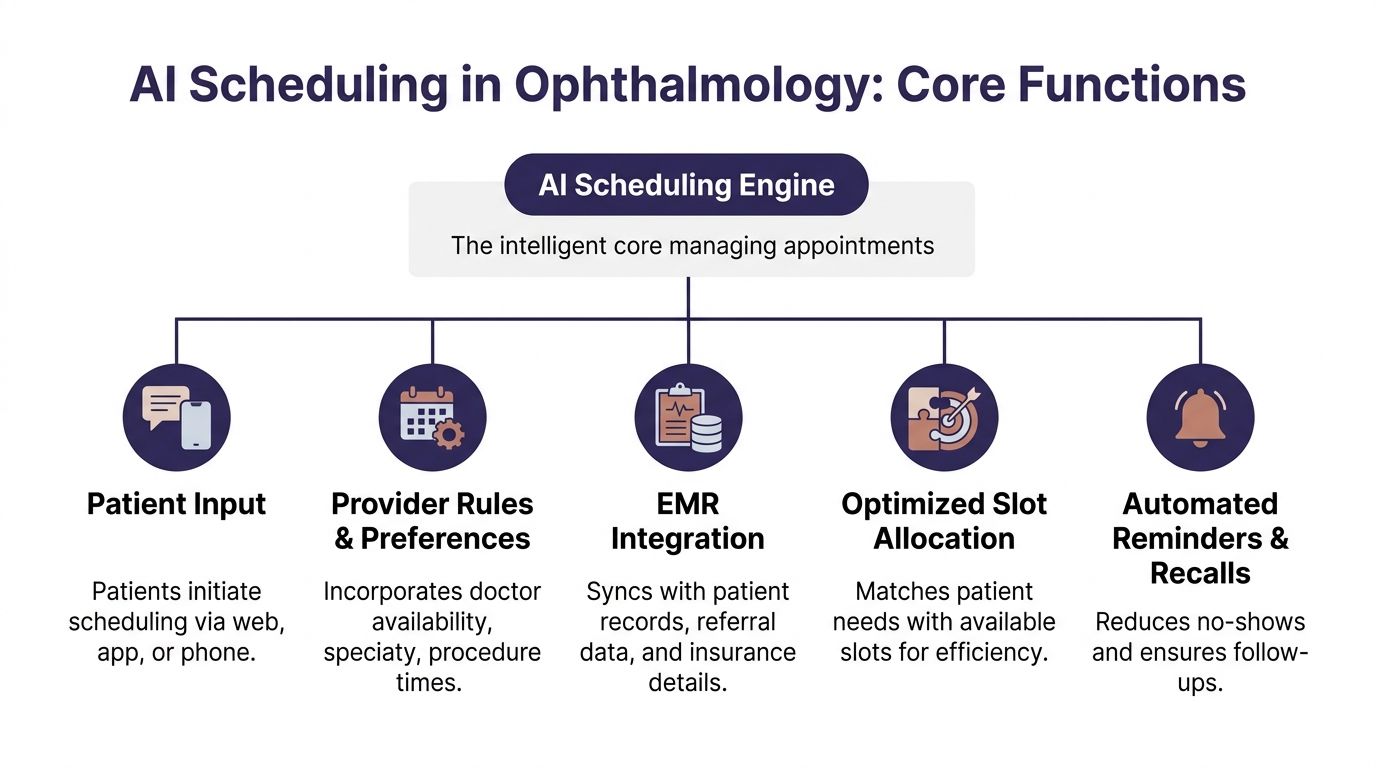
The engine: rules underneath
The part that matters most is not the voice. It is the scheduling engine behind it.
That engine should account for things like:
- Visit type logic. A routine annual exam is not a postop visit, and neither is a retina consult.
- Provider rules. Some doctors want certain follow-ups at specific intervals or only at certain locations.
- Resource needs. Certain visits need testing, imaging, or longer chair time.
- Patient status. New patient, established patient, surgery patient, urgent callback, overdue follow-up.
- Escalation paths. Some calls should book automatically. Others should go to staff.
This is why generic scheduling software often struggles in ophthalmology. It handles availability. It does not always handle nuance.
We tell practices to judge systems on one thing first. Can the tool reflect how your clinic schedules, not how a software company assumes clinics schedule?
If you want a broader look at what makes a platform usable in healthcare, this overview of medical appointment scheduling software is a useful starting point because it frames the decision around workflows rather than marketing claims.
What a good setup looks like in practice
A strong setup does not try to automate every edge case on day one.
It handles the common scheduling flows cleanly, then hands off unusual cases with context. That means the AI can answer, identify the patient’s need, offer valid options, and either book the visit or route the case to a staff member with notes attached.
We have found that clinics get better results when they define scheduling categories in plain language first. Not “protocol bucket B.” More like:
- annual eye exam
- glaucoma follow-up
- postop day or week follow-up
- cataract consult
- urgent symptoms needing staff review
That sounds simple, but it is where many rollouts go wrong. If your appointment logic is vague, the AI will expose the confusion instead of fixing it.
For a plain-English explanation of the category and how it works across healthcare, this page on https://www.simbie.ai/what-is-ai-scheduling-in-healthcare/ is a helpful reference.
If a scheduler needs tribal knowledge to book correctly, the AI needs that knowledge written down first.
Real-world benefits in ophthalmology practices
The business case for AI scheduling in eye care is not abstract. It shows up in access, schedule quality, and follow-up reliability.
The biggest shift is simple. Patients can book when they are ready to act, not only when your front desk is free.
Access improves because the clinic is reachable
AI scheduling systems let patients book 24 hours a day, which captures many patients who prefer scheduling after business hours. That matters because traditional front desks miss between 34 and 42 percent of incoming calls. Automated text and email reminders have also been shown to reduce no-show rates by up to 38 percent (MaximEyes).
Those numbers line up with what practice managers already feel every day. Demand is there. Access is the bottleneck.
In ophthalmology, that is not just a convenience issue. If a diabetic eye screening, glaucoma follow-up, or postop visit gets delayed because the patient never reached the office, the schedule problem becomes a care problem.
The gains are operational, not just cosmetic
When scheduling improves, the whole clinic runs better.
A better-built schedule means fewer short visits jammed into long slots and fewer long visits forced into short ones. It also means staff can spend less time chasing confirmations and more time fixing the exceptions that need a person.
Here is the practical difference:
| Metric | Traditional Front Desk | AI-Powered System |
|---|---|---|
| Booking availability | Limited to office hours | Available 24/7 |
| Incoming call handling | Missed calls are common during peaks | Can handle simultaneous scheduling requests |
| No-show prevention | Depends on manual reminder consistency | Automated text and email reminders |
| Complex routing | Depends on staff memory and manual notes | Uses predefined visit and provider rules |
| Staff time use | Large share goes to repetitive booking work | More time goes to exceptions and in-person service |
Ophthalmology gets extra value from follow-up discipline
This specialty has a lot of recurring care. That changes the economics of scheduling.
A missed annual exam is one thing. A missed pressure check, diabetic retinopathy screening, or postop follow-up is something else. The reminder and recall side of AI scheduling matters because it keeps patients connected to the schedule over time, not only at first booking.
We often tell managers not to think of reminders as a courtesy feature. In ophthalmology, they are part of follow-up operations.
If reducing no-shows is one of your main goals, this practical guide on https://www.simbie.ai/how-to-reduce-patient-no-shows/ is a useful place to compare reminder workflows and recall approaches.
The best scheduling system is not the one that books the most visits. It is the one that gets the right patients into the right slots, then gets them to show up.
How AI integrates with your EMR and phone systems
The most common fear we hear is simple. “Are we about to rip out systems that already sort of work?”
Usually, no.
A scheduling rollout works best when it connects to the systems your clinic already uses. In practice, that means your phone setup, your EMR or practice management system, and the scheduling templates your team relies on.
Integration should reduce clicks, not create a second workflow
If the AI books visits but your staff still has to re-enter everything by hand, you did not solve the problem. You added one.
The right integration lets the scheduling tool read appointment availability, apply scheduling rules, and write the booked visit back into the schedule your staff already trusts. It should also capture enough context so the team knows what happened on the call.
Operational AI is being adopted faster than clinical diagnostic AI because it faces lower regulatory hurdles. In ophthalmology operations, AI scribes and conversational AI can integrate directly with EHR systems to automate administrative tasks, handle patient triage, and manage multiple calls at once, which eliminates hold times and gives practices a faster path to return on investment (CRSToday).
That distinction matters. You are not asking the system to diagnose macular disease. You are asking it to manage phone and scheduling work in a controlled, auditable way.
The phone layer matters as much as the calendar layer
A lot of vendors talk about “online self-scheduling” as if that solves access. For ophthalmology, phone coverage still matters.
Many patients are older. Many want reassurance. Many are calling because they are confused about instructions, timing, or symptoms. So the phone system has to do more than answer. It has to identify intent, route correctly, and transfer gracefully when the request needs a human.
This is one reason we recommend testing the phone workflow before expanding digital channels. If the voice flow is clumsy, staff will still end up doing cleanup work all day.
We have worked with clinics using different setups, from cloud phone systems to integrated EHR scheduling modules. Simbie AI is one option practices use for voice-based scheduling and routine call handling because it connects with existing workflows rather than asking teams to abandon them.
Security questions should come early
Managers are right to ask about HIPAA, data access, recordings, audit trails, and permissions. Those are not procurement details. They shape how safe and workable the rollout will be.
A good evaluation asks:
- What data does the system access. Scheduling only, or chart context too.
- How is access controlled. Role-based permissions, logging, and review.
- What happens on escalation. Does the staff member receive context without extra exposure.
- How are calls and transcripts handled. Storage, retention, and policy controls.
If your team wants a plain-language refresher before vendor review, HIPAA Compliance for Healthcare Providers is a useful checklist-style read.
For a more specific look at the connection layer itself, this page on https://www.simbie.ai/integration-with-emr/ gives a straightforward view of how EMR integrations are typically structured.
A practical roadmap for implementing AI scheduling
The cleanest rollouts are not the biggest ones. They are the most disciplined ones.
Practices get into trouble when they try to automate every appointment type, every provider template, and every edge case from the start. We have had much better results when clinics treat implementation like an operations project, not a software launch.
Phase one is defining what success means
Start with the pain, not the product.
Maybe your biggest issue is missed new patient calls. Maybe it is no-shows for diabetic screening. Maybe your team spends too much time on routine rescheduling and confirmations. Pick the one or two problems that hurt the most and make them the first targets.
That focus shapes everything else. It tells you which call types to automate first, which provider templates need cleanup, and what your staff should watch for during the pilot.
Pilot with a narrow slice of scheduling
A pilot should be boring on purpose.
Good starting points include:
- Routine follow-ups where the rules are consistent.
- One provider or one location with a stable schedule.
- After-hours appointment requests that your team currently misses.
- Reminder and recall workflows for a specific patient group.
What usually does not work is starting with your messiest schedule template or your most politically sensitive physician calendar.
Use the Stanford example the right way
EyeWorld described how intelligent AI systems can calculate the time needed based on medical requirements, which lowers wait times. It also reported that Stanford’s STATUS program uses 10 AI-enabled cameras and screens about 100 patients a month for diabetic eye disease. Patients are getting earlier notifications, and follow-up rates have improved as a result (EyeWorld).
The lesson is not “copy Stanford.”
The lesson is that focused deployment works. They did not begin by trying to automate everything everywhere. They applied AI to a clear workflow with a clear follow-up purpose, then built from there.
Staff buy-in happens when the rules are visible
People resist black boxes. They usually do not resist relief.
We have found that staff adoption improves when the team can see exactly what the system will handle, what it will not handle, and how they can step in. That means giving them scripts, escalation rules, and examples of booked calls before go-live.
If staff think the tool is there to judge them, they will resist it. If they see it removing repetitive work, they will teach you how to make it better.
One practical move helps a lot. Ask your front desk leads to mark the top call types they want off their plate first. That creates better configuration and stronger buy-in at the same time.
Measuring success and common pitfalls to avoid
Once the system is live, the wrong metrics can fool you.
A vendor may tell you how many calls the AI answered. That number matters less than whether the clinic got easier to reach, the schedule got cleaner, and the staff got time back.
Track the operational measures that change decisions
The best scorecards stay close to daily pain.
Watch these first:
- Missed call volume. Is the clinic easier to reach than it was before?
- After-hours bookings. Are patients using the scheduling capacity you added?
- No-show trend by appointment type. Not just overall. Break it out where possible.
- Time staff spend on routine scheduling calls. Ask the team to estimate this before and after.
- Reschedule and rework rate. How often does a booked visit need manual correction?
- Follow-up completion for high-risk groups. Especially if you started with glaucoma, diabetic eye care, or postop flows.
Do not overcomplicate this at first. A simple weekly review is better than an elaborate dashboard nobody trusts.
Common mistakes we keep seeing
The first mistake is choosing a vendor that does not understand ophthalmology scheduling logic.
If the tool cannot distinguish the difference between a routine exam, a pressure check, a postop visit, and a surgical consult, your staff will become the backup scheduler for the AI. That is not adoption. That is hidden rework.
The second mistake is weak scripting.
A system can be technically sound and still fail because the phone experience feels stiff, confusing, or too generic. Patients need clear options, not robotic wording. We always advise practices to test scripts with real front desk staff because they know which phrases patients use.
The third mistake is poor template cleanup before launch.
AI will not fix a broken schedule template. If providers have inconsistent visit lengths, unwritten exceptions, or conflicting holds, the system will expose that fast. Clean the rules first.
The fourth mistake is rolling out without telling the staff what success looks like.
If no one knows whether the first goal is fewer hold times, better follow-up compliance, or less scheduling burden, every complaint becomes evidence that the rollout failed. Set one clear scoreboard.
What works better in practice
We have had stronger rollouts when clinics do four things consistently:
- Start with narrow automation instead of full coverage.
- Review booked calls early so bad logic gets fixed fast.
- Keep human handoff easy for edge cases and anxious patients.
- Use staff feedback as configuration input instead of treating it as resistance.
A final caution. Do not measure success only through labor reduction. In ophthalmology, schedule quality matters as much as headcount efficiency. A calmer front desk is good. A cleaner follow-up process is better.
Your next move is simpler than you think
You do not need a committee meeting or a giant tech review to decide whether this matters for your clinic.
Run a one-week audit.
The two numbers to track first
For five business days, record only these:
- How many calls the practice misses each day
- How much front desk time goes to scheduling calls
That second number does not need to be perfect. A manual estimate is fine if your team marks time blocks. The point is not accounting precision. The point is to make the problem visible.
What to look for at the end of the week
Patterns will show up fast.
You may learn that most missed calls happen during check-out peaks. You may learn that a huge share of phone time goes to routine rescheduling, confirmations, or repeat appointment requests. You may learn that one provider’s template creates more cleanup than the rest of the clinic combined.
That gives you a grounded starting point.
Now you are not talking about AI in general terms. You are talking about a measured problem inside your own operation. That makes the next conversation much easier with physicians, administrators, and front desk leads.
If you want a serious scheduling improvement project, start by measuring the work your team is already doing and the calls they cannot get to.
Once you have that week of data, decide on one pilot. Not ten. One. Maybe after-hours booking. Maybe glaucoma follow-ups. Maybe reminder and recall work for overdue patients. Keep it narrow enough that your team can judge the result clearly.
That is how most successful ophthalmology rollouts begin. Not with hype. With one visible problem, one clear workflow, and one test that staff can believe in.
If your practice wants help turning that one-week audit into a workable pilot, Simbie AI helps healthcare teams automate routine phone scheduling, connect with existing EMR workflows, and route patients to staff when a case needs human review.